<?xml version="1.0" encoding="utf-8"?><feed xmlns="http://www.w3.org/2005/Atom" ><generator uri="https://jekyllrb.com/" version="3.10.0">Jekyll</generator><link href="http://abstraction.blog/feed.xml" rel="self" type="application/atom+xml" /><link href="http://abstraction.blog/" rel="alternate" type="text/html" /><updated>2026-02-17T22:45:59+05:30</updated><id>http://abstraction.blog/feed.xml</id><title type="html">Abstraction.blog</title><subtitle>Valar Codilis. All must code.
</subtitle><author><name>Rohit Hegde</name></author><entry><title type="html">The Prompt Resurrection - 5 personal projects reborn with GenAI</title><link href="http://abstraction.blog/2026/02/13/the-prompt-resurrection-5-personal-projects-reborn-with-genai" rel="alternate" type="text/html" title="The Prompt Resurrection - 5 personal projects reborn with GenAI" /><published>2026-02-13T00:00:00+05:30</published><updated>2026-02-13T00:00:00+05:30</updated><id>http://abstraction.blog/2026/02/13/the-prompt-resurrection-5-personal-projects-reborn-with-genai</id><content type="html" xml:base="http://abstraction.blog/2026/02/13/the-prompt-resurrection-5-personal-projects-reborn-with-genai"><![CDATA[<blockquote>
  <p>“If I’m not back in five minutes, just wait longer.” — Ace Ventura: Pet Detective</p>
</blockquote>

<p>I am writing this blog after a break of two years due to milestones on the personal front which kept me busy.</p>

<p>The arrival of GenAI has lead to an unending stream of predictions for the future. From job loss to universal basic income…from SaaSpocalypse to having opensource projects overrun by agents…from getting cures for all diseases to getting wiped out by the Terminators.</p>

<p>Its important not to lose track of the present for an uncertain future. I chose to focus on the now and use GenAI to improve myself.</p>

<!--

A lot has happened since then. GenAI has swept into almost every tech discussion. Every blog and social media post seems to be AI generated. Its hard to scroll LinkedIn now.
Am using the #NoAIUsed tag to indicate that I wrote this post. It took me a few hours but its worth it. A creative outlet of sorts which I am proud to truly call my own.
-->

<!-- TOC -->

<ul>
  <li><a href="#the-projects">The projects</a>
    <ul>
      <li><a href="#coin-club">Coin club</a></li>
      <li><a href="#care-club">Care club</a></li>
      <li><a href="#campfire-club">Campfire club</a></li>
      <li><a href="#career-club">Career club</a></li>
      <li><a href="#core-club">Core club</a></li>
    </ul>
  </li>
  <li><a href="#tech-stack">Tech stack</a>
    <ul>
      <li><a href="#frontend">Frontend</a></li>
      <li><a href="#backend">Backend</a></li>
      <li><a href="#architecture">Architecture</a></li>
    </ul>
  </li>
  <li><a href="#lessons-learnt-using-genai-for-coding">Lessons learnt using GenAI for coding</a></li>
  <li><a href="#final-thoughts">Final thoughts</a></li>
</ul>

<!-- /TOC -->

<h2 id="the-projects">The projects</h2>

<p>Those who know me well often refer to me as the spreadsheet guy since I have been documenting my plans, comparing products, daily diary etc on Google spreadsheets for more than a decade. I wanted to try to consolidate some of them into my own apps which I could customise.</p>

<p>I originally had 2 apps in mind to organize my life a bit - a finance management app and another for a daily diary. As my idea grew to cover <a href="https://en.wikipedia.org/wiki/Maslow%27s_hierarchy_of_needs" target="\_blank" rel="nofollow">Maslow’s hierarchy of needs</a>, it became 5 apps to address different facets of life.
But I lacked the frontend skills to develop them as it was atleast a decade since i worked on the UI (AngularJS days). I found it hard to find time to learn a new framework. Working with the Cursor IDE on a React project at work gave me the confidence that I needn’t hold back anymore.</p>

<p>I wanted to have a suite of apps. The word “Club” sounded like a good idea to keep them together. Keeping the tradition of old super hero names(Clark Kent, Bruce Banner, Peter Parker, Wonder Woman etc), I decided to follow alliteration while naming each club.</p>

<div style="text-align: center;">
<img src="/assets/images/prompt-resurrection/club-suite.drawio.png" alt="Club suites" title="Club suite" />
</div>

<h3 id="coin-club">Coin club</h3>

<p>A finance management app. Some of the features it includes are:</p>

<ul>
  <li>Recurring bills with reminders</li>
  <li>Transactions (independent as well as those linked to bills)</li>
  <li>Investment (eg: mutual funds)</li>
  <li>Networth</li>
  <li>Finance advisor (business rules and potentially GenAI agent based)</li>
  <li>Analytics</li>
</ul>

<h3 id="care-club">Care club</h3>

<p>A health care app focused on physical and mental well being. I really needed this after my kid started to fall sick regularly for a couple of months. Some of the features it includes are:</p>

<ul>
  <li>Recurring medicine consumption list for reminders (similar to bills above)</li>
  <li>Medicines consumed (similar to transactions above)</li>
  <li>Historical tracking of medicines consumption(similar to transactions in Coin club)</li>
  <li>Daily diary for tracking my daily progress and encouraging mental wellness</li>
  <li>Analytics</li>
</ul>

<h3 id="campfire-club">Campfire club</h3>

<p>A social connections app to help keep track family and friends. I need it especially to stary connected with my large extended family. Some of the features it includes are:</p>

<ul>
  <li>Multiple social trees (Family tree, Friends tree etc)</li>
  <li>Profiles for each family and friend with reminders (birth, anniversaries etc)</li>
  <li>Conversation tracker for each person</li>
  <li>Reminders to connect with specific people</li>
  <li>Analytics</li>
</ul>

<h3 id="career-club">Career club</h3>

<p>A career tracking app for those working as well as those searching for jobs. Some of the features it includes are:</p>

<ul>
  <li>Career tracking of past and present jobs with goals for the future</li>
  <li>Certifications</li>
  <li>Daily work log</li>
  <li>“To do” list for work</li>
  <li>Job hunting which works with some popular sites for analysis</li>
  <li>Analytics</li>
</ul>

<h3 id="core-club">Core club</h3>

<p>An app which brings the previous apps together. Some of the features it includes are:</p>

<ul>
  <li>Maslow’s hierarchy of needs mapped to the other apps with scoring</li>
  <li>Reminders across all apps</li>
  <li>Motivation quotes (random)</li>
  <li>Weather reporting</li>
  <li>(More to come)</li>
</ul>

<h2 id="tech-stack">Tech stack</h2>

<h3 id="frontend">Frontend</h3>

<table>
  <thead>
    <tr>
      <th>Tech</th>
      <th>Purpose</th>
      <th>Comments</th>
    </tr>
  </thead>
  <tbody>
    <tr>
      <td>Vue</td>
      <td>UI framework</td>
      <td>Went with Vue.js it extends HTML similar to my first frontend framework AngularJS unlike React.</td>
    </tr>
    <tr>
      <td>Vite</td>
      <td>Build and dev server</td>
      <td> </td>
    </tr>
    <tr>
      <td>Pinia</td>
      <td>State management</td>
      <td> </td>
    </tr>
    <tr>
      <td>Vuetify</td>
      <td>The Vue component library</td>
      <td>Helps give the UI a beautiful polished look.</td>
    </tr>
  </tbody>
</table>

<h3 id="backend">Backend</h3>

<table>
  <thead>
    <tr>
      <th>Tech</th>
      <th>Purpose</th>
      <th>Comments</th>
    </tr>
  </thead>
  <tbody>
    <tr>
      <td>Python</td>
      <td>Backend programming language</td>
      <td>My goto programming language.</td>
    </tr>
    <tr>
      <td>FastAPI</td>
      <td>Web API framework</td>
      <td>Lightweight backend framework which I worked with in my past few projects at work.</td>
    </tr>
    <tr>
      <td>Postgres</td>
      <td>Relational database</td>
      <td>The most versatile opensource relational database out there.</td>
    </tr>
    <tr>
      <td>Podman</td>
      <td>Container runtime</td>
      <td>A drop-in replacement for Docker and Docker compose</td>
    </tr>
    <tr>
      <td>SQLAlchemy</td>
      <td>ORM and DB access</td>
      <td> </td>
    </tr>
    <tr>
      <td>Alembic</td>
      <td>DB migrations</td>
      <td> </td>
    </tr>
  </tbody>
</table>

<h3 id="architecture">Architecture</h3>

<p>Its a simple client-server architecture with each app accessing two Postgres databases:</p>

<ol>
  <li>A shared database to store data like user login credentials for a SSO like experience across apps.</li>
  <li>A database to store app specific data like app settings, transactions etc.</li>
</ol>

<p>I have used business rules based high level insights in some places followed by local LLM calls for providing some deep insights. Details of this to come up in app specific blog posts.</p>

<p>No vector database as of now since the LLM calls are considerably lightweight with no expected context issues.</p>

<div style="text-align: center;">
<img src="/assets/images/prompt-resurrection/clubs-architecture.drawio.png" title="Archictecture" />
</div>

<h2 id="lessons-learnt-using-genai-for-coding">Lessons learnt using GenAI for coding</h2>

<p>While I began developing the apps over weekends sometime in May 2025, it took me quite a while to get them into a state which I was happy with.
Since it was easy to create prototypes, my initial 1.0 version of Coin Club was light weight with just a frontend and a Google spreadsheet as database. It worked well initially but Google Drive API limits forced me to adopt caching techniques and the frontend started to become complex. Eventually I decided to move to a container based setup and have a standard SQL database. I thus had my 2.0 version sometime in October 2025.</p>

<p>Plenty of lessons learnt in this journey till now.</p>

<div style="overflow-x: auto;">
<table>
<colgroup>
<col style="width: 10%;" />
<col style="width: 65%;" />
<col style="width: 25%;" />
</colgroup>
<thead>
<tr>
<th>Topic</th>
<th>Details</th>
<th>Screenshots</th>
</tr>
</thead>
<tbody>
<tr>
<td>Mere prototypes</td>
<td>The initial versions worked but could never be deemed as production grade. I had to use multiple prompts to get the code refactored into an organized form (eg: Controller -&gt; Service -&gt; Model, all configurations in a central location etc). I didnt want to use agents.md or cursor.md files back then.</td>
<td></td>
</tr>
<tr>
<td>Code Hallucination</td>
<td>I had asked for frontend visualisation libraries to show my connections in a tree form. The LLM suggested a few options but some of them simply didnt exist.</td>
<td><a href="/assets/images/prompt-resurrection/code-hallucination.png" target="_blank" rel="noopener noreferrer"><img src="/assets/images/prompt-resurrection/code-hallucination.png" style="border: 1px solid  gray;" height="30%" width="30%" /></a></td>
</tr>
<tr>
<td>Suggesting the most complex option</td>
<td>I had asked for options to integrate the different apps together. Module Federation was overkill for my scenario but I tested the LLM by asking if it would be a good option for me. The LLM was eager to please and agreed with my suggestion 😅.</td>
<td><a href="/assets/images/prompt-resurrection/module-federation.png" target="_blank" rel="noopener noreferrer"><img src="/assets/images/prompt-resurrection/module-federation.png" style="border: 1px solid  gray;" height="30%" width="30%" /></a></td>
</tr>
<tr>
<td>Migration not following conventions</td>
<td>I had asked for some changes in the database table. The LLM went with direct python scripts with SQL DDL statements instead of creating ORM migration files.</td>
<td><a href="/assets/images/prompt-resurrection/migration.png" target="_blank" rel="noopener noreferrer"><img src="/assets/images/prompt-resurrection/migration.png" style="border: 1px solid  gray;" height="30%" width="30%" /></a></td>
</tr>
</tbody>
</table>
</div>

<h2 id="final-thoughts">Final thoughts</h2>

<p>The apps are not fully ready yet. Some of the dashboards and some of the analytics pages are pending. Coin club is at the highest maturity since it was the first app in this suite. Core club is barely started since it was the last one taken up. I will be creating a blog post for each app once its ready along with opensourcing the app on Github.com. Expect Coin club to be released in the next few weeks.
Its been fun to develop the apps using GenAI though I miss not having written major chunks of it. Its a bit like sliding down a slope at a high speed enjoying the breeze but missing out on the scenary. I did hit the brakes a few times to review the code but its not the same…</p>

<p>I miss the old days of development but can’t help remembering that <strong>change is the only thing thats constant in our line of work</strong>.</p>]]></content><author><name>Rohit Hegde</name></author><category term="genai" /><category term="cursor" /><category term="llm" /><category term="python" /><summary type="html"><![CDATA[“If I’m not back in five minutes, just wait longer.” — Ace Ventura: Pet Detective]]></summary></entry><entry><title type="html">An intuitive documentation strategy</title><link href="http://abstraction.blog/2023/11/22/intuitive-documentation-strategy" rel="alternate" type="text/html" title="An intuitive documentation strategy" /><published>2023-11-22T00:00:00+05:30</published><updated>2023-11-22T00:00:00+05:30</updated><id>http://abstraction.blog/2023/11/22/intuitive-documentation-strategy</id><content type="html" xml:base="http://abstraction.blog/2023/11/22/intuitive-documentation-strategy"><![CDATA[<p>I wrote this blog post to share some of my learnings on creating intuitive documentation for products and projects over the past decade or so. This post is for those of you looking to make your documentation interesting enough for the audience to keep coming back for more.</p>

<!-- TOC -->

<ul>
  <li><a href="#the-current-state-of-documentation">The current state of documentation</a></li>
  <li><a href="#benefits-of-good-documentation">Benefits of good documentation</a></li>
  <li><a href="#how-to-create-intuitive-documentation">How to create intuitive documentation</a>
    <ul>
      <li><a href="#manifesto">Manifesto</a></li>
      <li><a href="#folder-structure">Folder structure</a>
        <ul>
          <li><a href="#eg---cloud-product">Eg - Cloud product</a></li>
          <li><a href="#eg---process">Eg - Process</a></li>
        </ul>
      </li>
      <li><a href="#important-documents">Important documents</a>
        <ul>
          <li><a href="#readmemd">README.md</a></li>
          <li><a href="#onboarding-sessions-guide">Onboarding sessions guide</a></li>
          <li><a href="#working-on-the-first-story-guide">Working on the first story guide</a></li>
          <li><a href="#architecture">Architecture</a></li>
          <li><a href="#features-watch-list">Features watch list</a></li>
          <li><a href="#specialist-path-guides">Specialist path guides</a></li>
        </ul>
      </li>
      <li><a href="#automation">Automation</a></li>
    </ul>
  </li>
  <li><a href="#final-thoughts">Final thoughts</a></li>
</ul>

<!-- /TOC -->

<blockquote>
  <p>“I have some paperwork to catch up. If I am not back in two days, organize a search and rescue team!” - Stanley Parker from The Better Half comic.</p>
</blockquote>

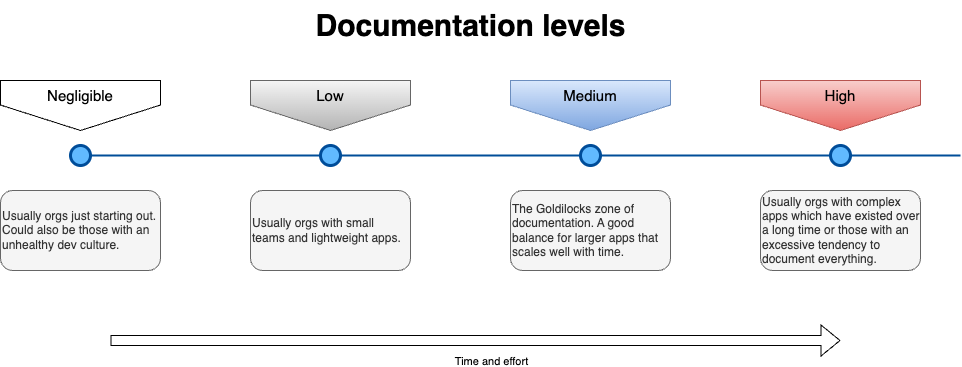
<p>This post is focused on creating an intuitive documentation which scales for a large product. So it focuses on the balanced approach - between the low and high documentation levels below.</p>

<p><img src="/assets/images/documentation/documentation-zones.drawio.png" alt="&quot;Documentation zones&quot;" title="Documentation zones" /></p>

<h2 id="the-current-state-of-documentation">The current state of documentation</h2>

<ul>
  <li>The quality of documentation of a product can be considered as a barometer of the developer’s empathy. However it remains one of the most ignored parts of the software world.</li>
  <li>As the famous line in the Matrix movie series goes “There is a difference in knowing the path and walking the path”. A lot of people merely preach about good documentation while creating a lacklustre README.md file in the repo.</li>
  <li>Projects done by a lot of consultancies add documentation at the fag end of the work as an afterthought ensuring not much time is given to developing it.</li>
</ul>

<h2 id="benefits-of-good-documentation">Benefits of good documentation</h2>

<p>Good intuitive documentation can be helpful in many ways. It can:</p>

<ul>
  <li>Enable faster handover of projects to client tech teams.</li>
  <li>Reduce dependency on core team members.</li>
  <li>Enable easier maintenance of documentation.</li>
  <li>Simplify onboarding for new team members.</li>
  <li>Provide better estimation of the time needed for onboarding a new team member.</li>
  <li>Achieve easier compliance of a product’s vision.</li>
  <li>Guide engineers in their day to day work.</li>
</ul>

<h2 id="how-to-create-intuitive-documentation">How to create intuitive documentation</h2>

<p>My playbook for creating intuitive documentation :</p>

<ol>
  <li>Creating a simple manifesto/vision.</li>
  <li>Creating a intuitive folder structure.</li>
  <li>Creating specific documents to aid onboarding.</li>
  <li>Automating creation of documentation where it adds value.</li>
</ol>

<h3 id="manifesto">Manifesto</h3>

<p>Translating the vision of the core engineers for the rest of the team is easier with a simple manifesto. Here is an example:</p>

<ul>
  <li>Engineers should update the technical documentation.
    <ul>
      <li>Good documentation comes from empathy ie the desire to share the knowledge and enable a smooth onboarding experience.</li>
      <li>Involve technical writers and analysts only if the audience are not engineers.</li>
    </ul>
  </li>
  <li>New documentation should ALWAYS be reviewed.
    <ul>
      <li>PR if its a code repo, <a href="https://confluence.atlassian.com/confeval/confluence-evaluator-resources/confluence-workflows-approval" target="\_blank" rel="nofollow">Automated review process</a> if Atlassian’s Confluence or a simple people process to ensure engineers always tag reviewers on their documentation.</li>
    </ul>
  </li>
  <li>Simplify learning experience for engineers.
    <ul>
      <li>Keep it as visual as possible. Use the <a href="https://en.wikipedia.org/wiki/4%2B1_architectural_view_model" target="\_blank" rel="nofollow">4+1 architectural view model</a> OR <a href="https://c4model.com/" target="\_blank" rel="nofollow">C4 model</a> to show different perspectives.</li>
      <li>Use a layered approach to explain complex concepts and avoid overwhelming the audience. Use pre-read or post-read sections in a document to recommend a user journey.</li>
      <li>Use draw.io to store the diagrams in the VCS to access the diagrams without a license.</li>
    </ul>
  </li>
</ul>

<h3 id="folder-structure">Folder structure</h3>

<p>Having an intuitive folder structure or hierarchy is extremely essential for navigating through the documentation with ease. Dont worry about the documents given in them. I have explained that in the documents section next. Lets go through few examples below.</p>

<p>Note : I have considered a documentation repo consisting of markdown files. You can assume similar structure for other tools like Confluence or Google drive or Sharepoint.</p>

<h4 id="eg---cloud-product">Eg - Cloud product</h4>

<div class="language-bash highlighter-rouge"><div class="highlight"><pre class="highlight"><code>📁 azure
   ├ 📁 architecture
   │    ├ 📁 architecture-decision-records
   │    │    ├ 📁 2023
   │    │    │  ├ 📄 1-adr-some-feature.md
   │    │    │  ├ 📄 2-adr-some-feature-again.md
   │    │    ├ 📁 2024
   │    ├ 📁 latest
   │    │    ├ 📄 integrations.md
   │    │    ├ 📄 automations.md
   │    │    ├ 📄 org-hierarchy.md
   │    │    ├ 📄 network-traffic.md
   │    │    ├ 📄 tech-stack.md
   │    │    ├ 📄 well-architected-framework.md
   ├ 📁 guides
   │    ├ 📄 1-onboarding-sessions.md
   │    ├ 📄 2-working-on-the-first-story.md
   │    ├ 📄 3-troubleshooting.md
   │    ├ 📁 specialized
   │    │    ├ 📄 1-k8s-engineer-path.md
   │    │    ├ 📄 2-cloud-engineer-path.md
   ├ 📁 development
   │    ├ 📁 ai
   │    ├ 📁 compute
   │    ├ 📁 data
   │    ├ 📁 devops
   │    │    ├ 📁 iac
   │    │    │    ├ 📁 styleguide
   │    │    │    │    ├ 📄 resource-naming-conventions.md
   │    │    │    │    ├ 📄 variable-naming-conventions.md
   │    │    │    ├ 📁 testing
   │    │    │    │    ├ 📄 conventions.md
   │    │    │    ├ 📁 features-watch-list
   │    │    │    │    ├ 📄 2023-01-10.md
   │    │    │    │    ├ 📄 yy-mm-dd.md
   │    │    ├ 📄 versioning.md
   │    ├ 📁 monitoring
   │    ├ 📁 networking
   │    ├ 📁 security
   │    │    ├ 📄 k8s-security-matrix.md
   │    │    ├ 📄 personas.md
   │    │    ├ 📄 security.md
   ├ 📁 rfc
   │    ├ 📁 ai
   │    ├ 📁 compute
   │    │    ├ 📄 k8s-production-best-practices.md
   │    ├ 📁 data
   │    ├ 📁 devops
   │    ├ 📁 monitoring
   │    ├ 📁 networking
   │    ├ 📁 security
   ├ 📄 README.md
   ├ 📄 .gitignore

</code></pre></div></div>

<ul>
  <li>Above folder structure is for Azure cloud but it can be extended for multi-cloud. Have a folder for each cloud and a common folder for documentation which is cloud agnostic.</li>
  <li>Important to have year based folders for easier segregation of ADR like documents which will keep getting created for the lifetime of a product.</li>
  <li>Essential to have the latest state of the architecture in one place as it provides a high level technical overview of the entire product.</li>
  <li>The guides folder has onboarding journeys which have to be seen by every new team member.</li>
  <li>The development folder contains implementation details. The folder above contains some of the main pillars of a cloud setup.</li>
  <li>The rfc folder is optional. I used it to seperate research documentation from actual implementation. It helped me easily transfer implementation documentation to clients.</li>
</ul>

<h4 id="eg---process">Eg - Process</h4>

<div class="language-bash highlighter-rouge"><div class="highlight"><pre class="highlight"><code>├ 📁 process
|   ├ 📁 agile
|   |   ├ 📄 ceremonies.doc
|   |   ├ 📄 definition-of-ready.doc
|   |   ├ 📄 definition-of-done.doc
|   |   ├ 📁 sprints
|   |   |   ├ 📁 2023
|   |   |   |   ├ 📁 sprint1
|   |   |   |       ├ 📄 sprint1-review.doc
|   |   |   |       ├ 📄 sprint1-retro.doc
|   |   |   ├ 📁 2024
|   ├ 📁 releases
|   |   ├ 📁 2023
|   |   |   ├ 📄 release-2023-01-19.doc
|   |   |   ├ 📄 release-2023-02-02.doc
|   |   ├ 📁 2024
</code></pre></div></div>

<p>The files above represent word or txt files in a file storage tool. This is useful as :</p>

<ul>
  <li>It makes it easy for the non-devs (Product Owners, Scrum masters etc) to update it directly.</li>
  <li>The files here do not necesarily need a review.</li>
</ul>

<p>You can have them in a repo as markdown too if you need a consistent user experience though its probably overkill.</p>

<h3 id="important-documents">Important documents</h3>

<p>There are some documents which can immensely help the overall team. Let me share few of them.</p>

<h4 id="readmemd">README.md</h4>

<p>The <code class="language-plaintext highlighter-rouge">README.md</code> file should contain the highlights of the app and absolute basics needed to use it. Anything more and you lose the audience. Keep the other important stuff in some sort of documentation repo or wiki.</p>

<h4 id="onboarding-sessions-guide">Onboarding sessions guide</h4>

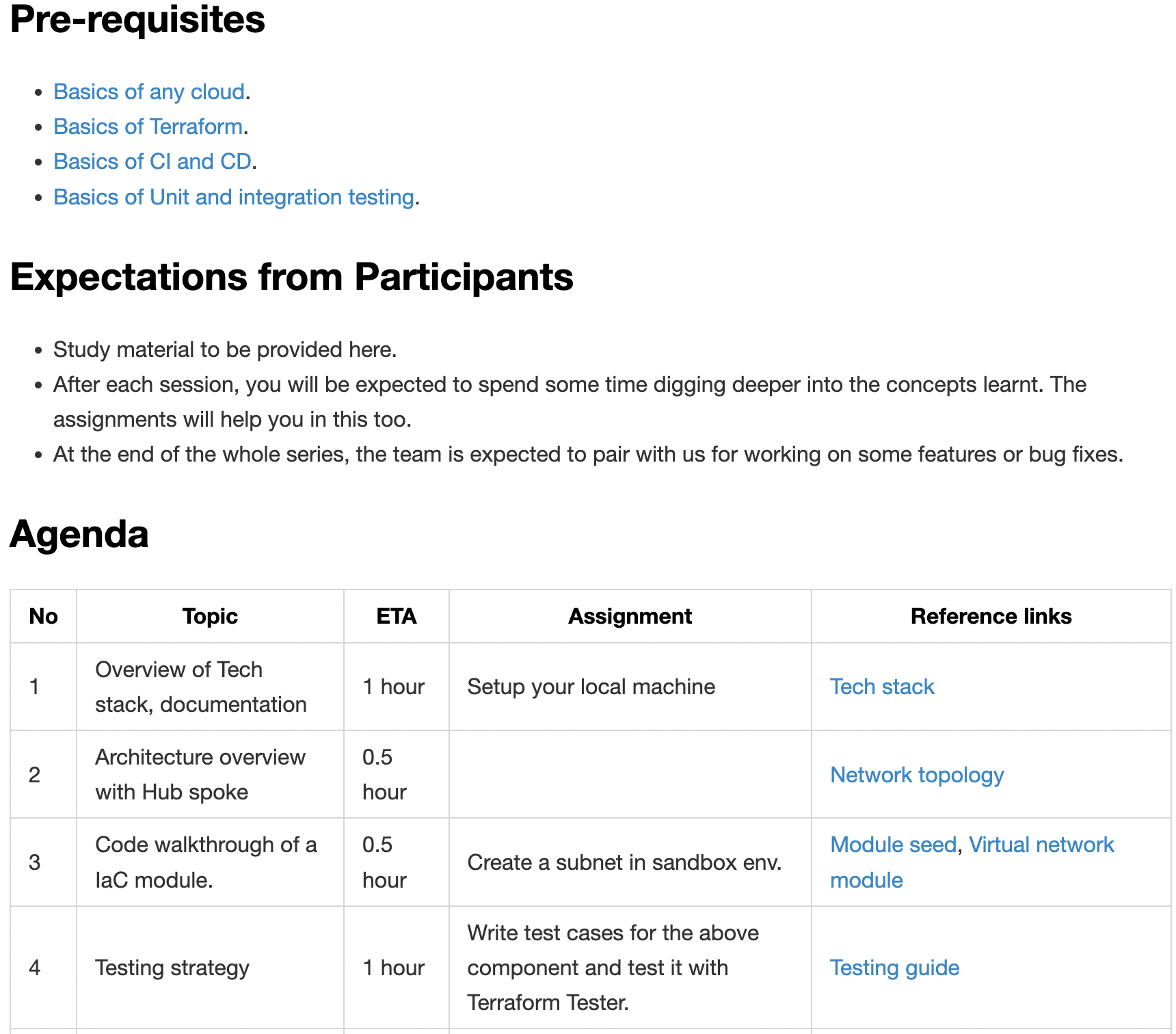
<ul>
  <li>This doc helps to estimate the onboarding experience if it involves live or recorded video sessions.</li>
  <li>It also helps to highlight the main topics in a sequential flow needed for a successful onboarding.</li>
</ul>

<p>Eg:</p>

<p><img src="/assets/images/documentation/onboarding-sessions.png" style="border: 1px solid  gray;" height="60%" width="60%" /></p>

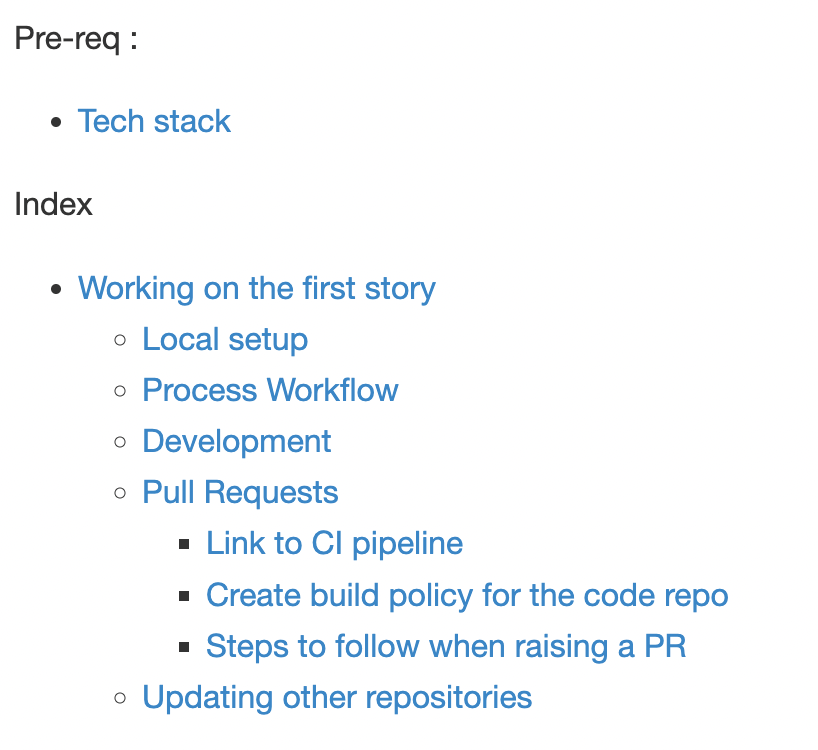
<h4 id="working-on-the-first-story-guide">Working on the first story guide</h4>

<p>This doc jots down the exact steps to implement a story and have it deployed to prod. It involves issue tracking process, team review process, git changes, release process etc. It helps to remove ambiguity from the whole process.</p>

<p>Eg:</p>

<p><img src="/assets/images/documentation/first-story.png" style="border: 1px solid  gray;" height="60%" width="60%" /></p>

<h4 id="architecture">Architecture</h4>

<ul>
  <li><code class="language-plaintext highlighter-rouge">integrations.md</code> - Lists all the 3rd party integrations in place with links to further details.</li>
  <li><code class="language-plaintext highlighter-rouge">automations.md</code> - Lists all the automations in place with links to further details. Eg: Resource cleaning cron for sandbox cloud accuounts.</li>
  <li><code class="language-plaintext highlighter-rouge">tech-stack.md</code> - Lists all the technologies in place with details on why they are used. Also lists best external or internal resources to learn more about them.</li>
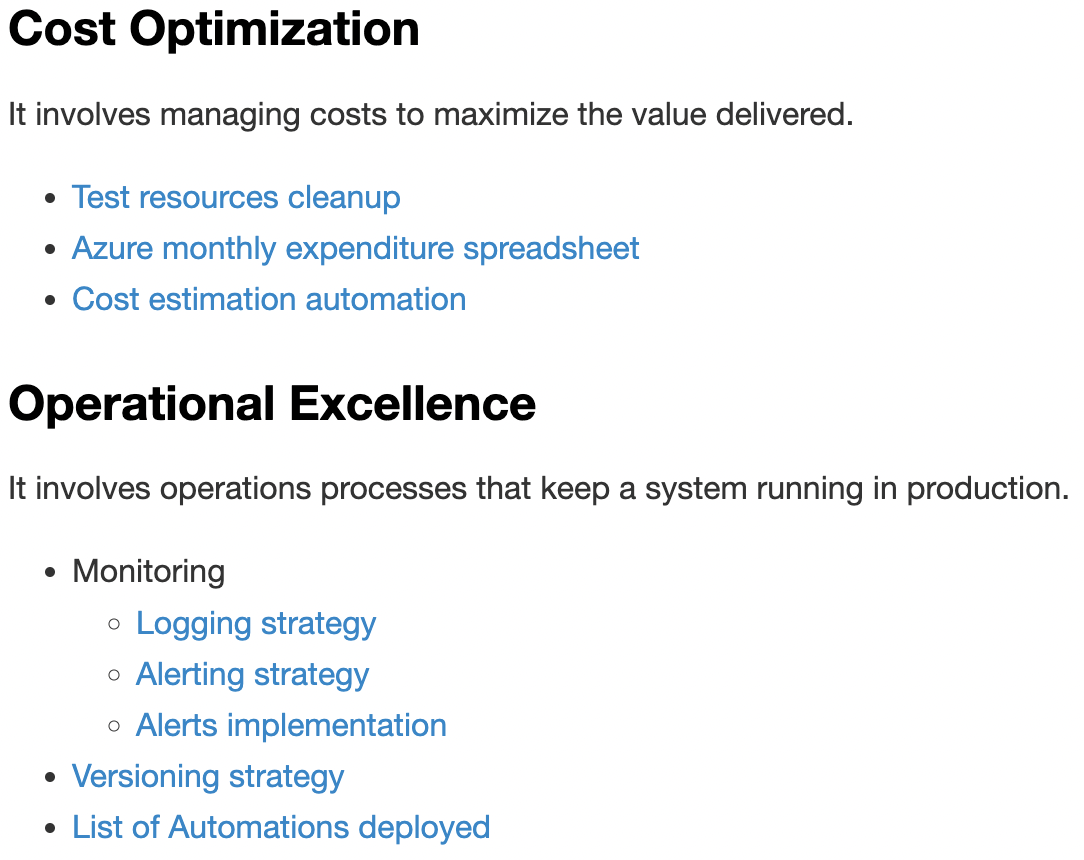
  <li><code class="language-plaintext highlighter-rouge">well-architected-framework.md</code> - An extremely important document which views the entire product from the prism of an industry recognized framework. This makes it easy to pitch the product to potential clients or internal tech leadership.</li>
</ul>

<p>Eg:</p>

<p><img src="/assets/images/documentation/well-architected-framework.png" style="border: 1px solid  gray;" height="60%" width="60%" /></p>

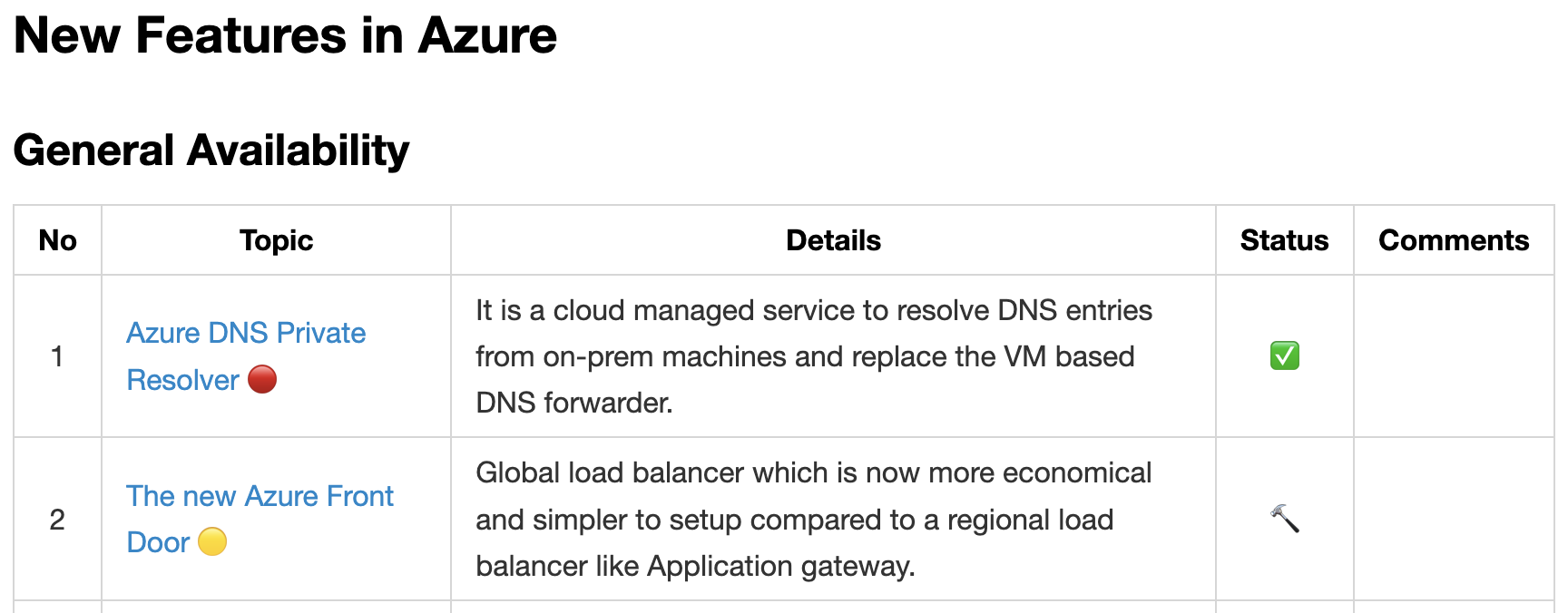
<h4 id="features-watch-list">Features watch list</h4>

<ul>
  <li>This document aids product maintenance. Taking the example of a cloud based product, you can view the new features of a specific cloud provider for the last one year(depending on the frequency of the exercise) and prioritise specific ones. Same applies for any tech - whether its a cloud product or a frontend framework.</li>
  <li>It can have different sections of “General Availability” and “Public preview” with top 10 features in each that you want to add to your product. The ones in “Public Preview” are prioritised ONLY if its absolutely needed.</li>
</ul>

<p>Eg:</p>

<p><img src="/assets/images/documentation/features-watch-list.png" style="border: 1px solid  gray;" height="60%" width="60%" /></p>

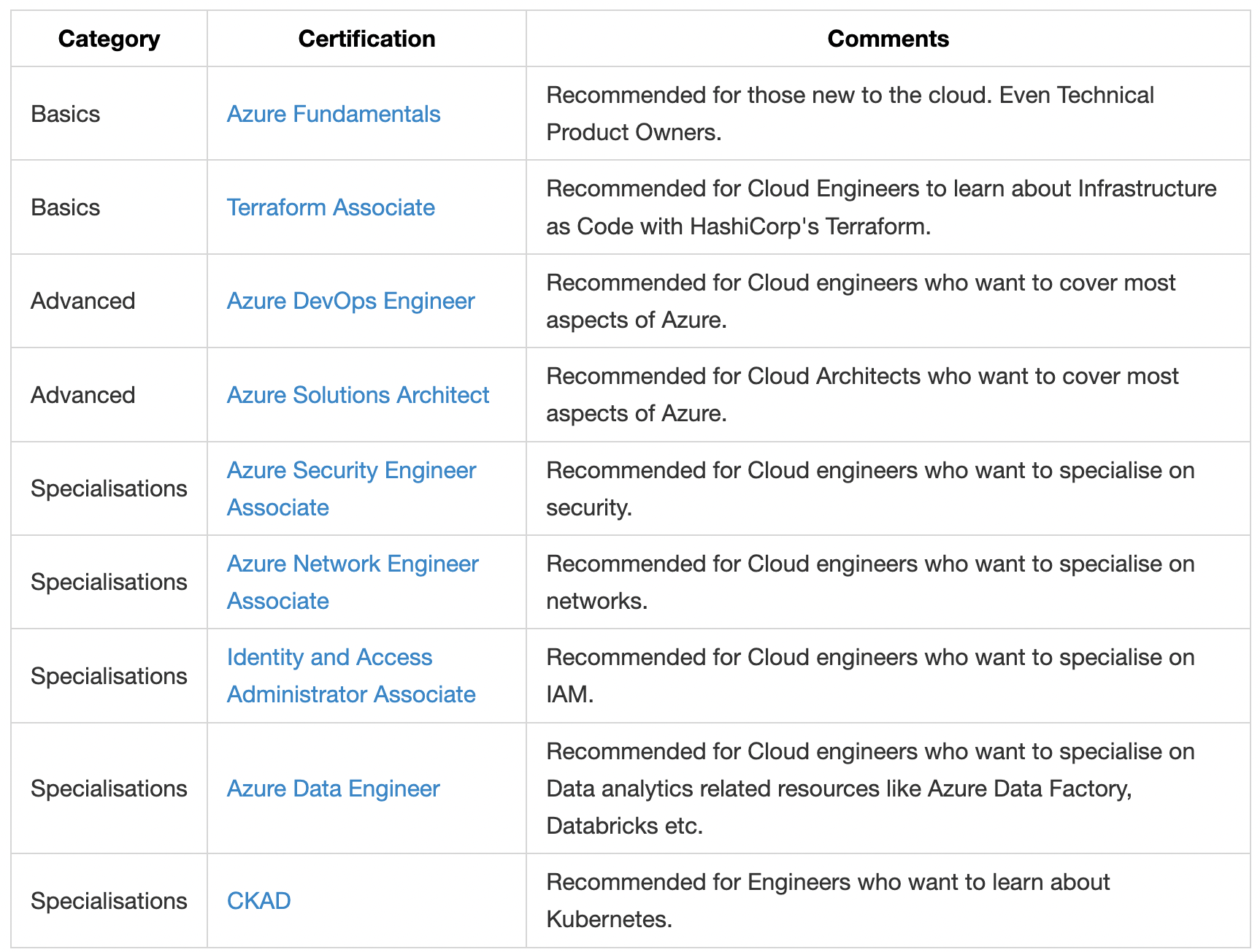
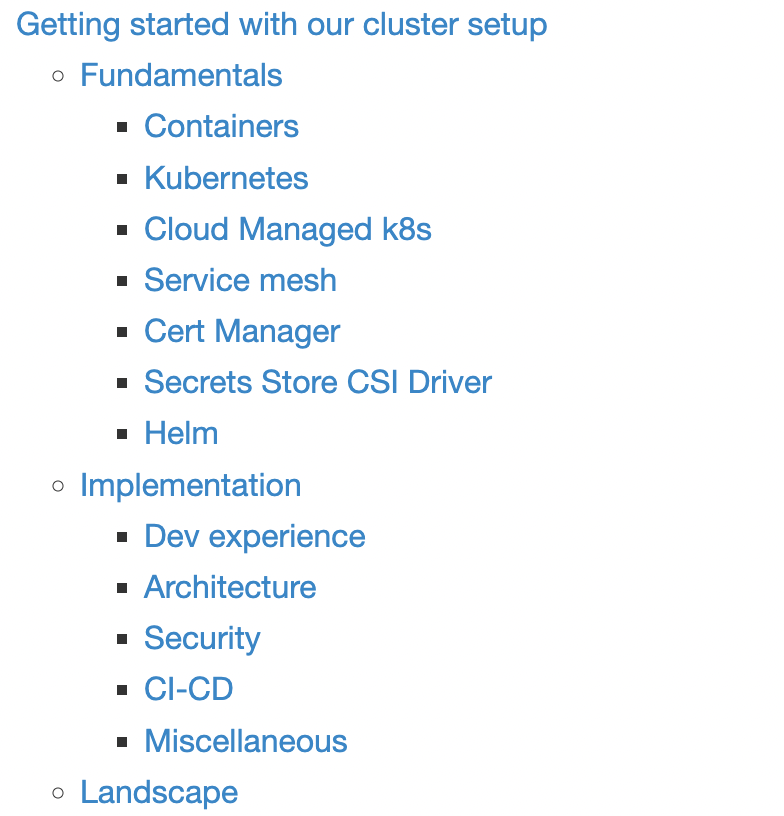
<h4 id="specialist-path-guides">Specialist path guides</h4>

<p>This set of documents define the personas which are needed for the team. It can contain a list of certifications or custom list of skills/tech or some combo of the two so that it sets up the new team member for success in the team and maybe even his/her career.</p>

<p>Eg of certifications for an Azure cloud engineer :</p>

<p><img src="/assets/images/documentation/cloud-engineer.png" style="border: 1px solid  gray;" height="60%" width="60%" /></p>

<p>Eg of knowledge needed to master a specific k8s cluster setup :</p>

<p><img src="/assets/images/documentation/k8s-engineer.png" style="border: 1px solid  gray;" height="60%" width="60%" /></p>

<h3 id="automation">Automation</h3>

<p>Some of the documentation can be auto generated as long as they follow specific conventions or templates.Eg: API docs, Change logs, Release docs etc.</p>

<ul>
  <li>Automate generation of the tech aspects of the README.md of a repo as also tag creation using simple bash.</li>
  <li>Tools like <a href="https://docusaurus.io/docs/playground" target="\_blank" rel="nofollow">Docusaurus</a> which offer an easy to use opinionated documentation structure and website. Do note that they merely focus on the high level folder structure and setup aspects.</li>
  <li>Tools like <a href="https://github.com/slatedocs/slate?utm_source=abstraction.blog" target="\_blank" rel="nofollow">Slate</a> provides beautiful static documentation for your API.</li>
  <li>Tools like Spotify’s <a href="https://backstage.io/" target="\_blank" rel="nofollow">Backstage</a> help you create a developer portal and catalog of your services. Plenty of addons allow you to add a great number of automations and customisations.</li>
</ul>

<h2 id="final-thoughts">Final thoughts</h2>

<p>After all this - you might say “This looks to be good doc strategy. But whats the point if the team doesnt update it ?”. You resolve it through processes. Make reviews part of the process. Dont approve the PR if the docs arent reviewed.</p>

<p>Additionally - while automation can help offboard some of the document generation but an interesting document will still need imagination and ingenuity from a human who cares (or generative AI?).</p>

<p><br />Feel free to share your experiences. Every bit of knowledge helps :blush:.</p>]]></content><author><name>Rohit Hegde</name></author><category term="cloud" /><category term="documentation" /><category term="guide" /><category term="strategy" /><category term="azure" /><category term="aws" /><category term="gcp" /><category term="kubernetes" /><summary type="html"><![CDATA[I wrote this blog post to share some of my learnings on creating intuitive documentation for products and projects over the past decade or so. This post is for those of you looking to make your documentation interesting enough for the audience to keep coming back for more.]]></summary></entry><entry><title type="html">SAA-C03 : Preparing for the AWS Solutions Architect Associate certification</title><link href="http://abstraction.blog/2023/07/16/aws-solutions-architect-associate-certificate" rel="alternate" type="text/html" title="SAA-C03 : Preparing for the AWS Solutions Architect Associate certification" /><published>2023-07-16T00:00:00+05:30</published><updated>2023-07-16T00:00:00+05:30</updated><id>http://abstraction.blog/2023/07/16/aws-solutions-architect-associate-certificate</id><content type="html" xml:base="http://abstraction.blog/2023/07/16/aws-solutions-architect-associate-certificate"><![CDATA[<p>A brand new guide to prepare for the AWS Certified Solutions Architect Associate certification exam (SAA-C03) in 2023.</p>

<!-- TOC -->

<ul>
  <li><a href="#background">Background</a></li>
  <li><a href="#preparation">Preparation</a>
    <ul>
      <li><a href="#udemy-course-by-stephane-maarek">Udemy course by Stephane Maarek</a></li>
      <li><a href="#practice-tests">Practice tests</a></li>
    </ul>
  </li>
  <li><a href="#certification-exam">Certification exam</a>
    <ul>
      <li><a href="#online-exam">Online exam</a>
        <ul>
          <li><a href="#process-before-the-online-exam">Process before the online exam</a></li>
          <li><a href="#giving-the-online-exam">Giving the online exam</a></li>
        </ul>
      </li>
      <li><a href="#test-center-exam">Test center exam</a>
        <ul>
          <li><a href="#process-before-the-exam">Process before the exam</a></li>
          <li><a href="#giving-the-exam">Giving the exam</a></li>
        </ul>
      </li>
    </ul>
  </li>
  <li><a href="#final-thoughts">Final thoughts</a></li>
</ul>

<!-- /TOC -->

<h2 id="background">Background</h2>

<blockquote>
  <p>“Surpass your limits. The path will open up for you” - Yami Sukehiro from the anime “Black Clover”.</p>
</blockquote>

<p>I have been working on Azure cloud infrastructure for the past 3 years which enabled me to go really deep into it. Azure certs allowed me to explore further. I am now interested in refreshing my past experience with the other 2 major clouds. Certifications in them seems to be the logical next step of my journey :smile:.</p>

<p>I decided to pursue the “Architect” cloud certification path as it matched my role at work and I had <a href="http://abstraction.blog/#certification" target="\_blank">already achieved this path for Azure cloud</a>. So here is my journey to get the <a href="https://aws.amazon.com/certification/certified-solutions-architect-associate/" target="\_blank" rel="nofollow">AWS Solutions Architect Associate cert</a>.</p>

<p>I had studied for this exam back in 2017 when I was an Application Architect. But I didnt give it as I used to fall asleep at the S3 buckets part of the syllabus :sweat_smile:. That changed after I went deep into the Azure cloud as a cloud engineer and I began practically exploring the details :smile:.</p>

<p><img src="/assets/images/certifications/aws-aschitect-associate.png" alt="&quot;AWS Solutions Architect Associate&quot;" title="AWS Solutions Architect Associate" height="30%" width="30%" /></p>

<h2 id="preparation">Preparation</h2>

<ul>
  <li>The <a href="https://d1.awsstatic.com/training-and-certification/docs-sa-assoc/AWS-Certified-Solutions-Architect-Associate_Exam-Guide.pdf" target="\_blank" rel="nofollow">AWS exam guide for this cert</a> lists the weightage of the 5 main topics but that isnt very helpful as there can be overlap of resources between them. Eg : Design High-Performing Architectures vs Design Cost-Optimized Architectures.</li>
  <li><strong>The important part of this exam guide is the AWS Resources section at the end of the document</strong>. It is a non-exhaustive list of which resources are in syllabus and which are not. So at the end of your preparation, its good to know atleast the purpose of each resource in the list.</li>
</ul>

<h3 id="udemy-course-by-stephane-maarek">Udemy course by Stephane Maarek</h3>

<ul>
  <li>I prepared with <a href="https://mckinsey.udemy.com/course/aws-certified-solutions-architect-associate-saa-c03/" target="\_blank" rel="nofollow">Stephane Maarek’s course</a> due to its popularity.</li>
  <li>It has a duration of 27 hours and is well detailed with focus on edge cases too. Stephane has gone the extra mile to try by covering plenty of topics from the exam point of view and it gets regularly updated.</li>
  <li>One practice test is given here with 65 questions.</li>
  <li>I went through the course at 1.5x speed to save some time. Took me a month balancing it with my work. I revised the syllabus by going through the excellent notes (PDF) provided in the course.</li>
  <li>Do note that the syllabus is HUGE ! There are a thousand things that can be asked and you will likely not be ready for it (Eg: Selecting the right EBS volume based on desired IOPS). So just doing this course will not be enough. You have to spend time on the practice tests as well as explore related AWS documentation to increase your coverage.</li>
</ul>

<h3 id="practice-tests">Practice tests</h3>

<ul>
  <li>After studying for the certification, I decided to go for the single practice test given in the above course as well as enroll for the <a href="https://mckinsey.udemy.com/course/practice-exams-aws-certified-solutions-architect-associate/" target="\_blank" rel="nofollow">6 practice tests by Stephane Maarek and Abhishek Singh</a>.</li>
  <li>As expected, the practice tests were tough. You dont remember the tiny details unless you see it in an exam :sweat_smile:. But the act of giving many practice tests allows you to memorize your studied content better to help when you give the actual exam.</li>
  <li>I didnt do well in my 1st attempt but it was near the 72% cutoff that is needed to pass the exam. So I decided to identify and improve on my gaps in knowledge after every exam. After giving 7 practice tests, I decided to go for round 2 of the same tests again. This time I crossed the 90s for most of them. I was able to complete each exam with 30 mins to spare.</li>
  <li>Something which helped me - I realized that <strong>some of the answers given in “Review questions” section at the end of a practice test were outdated</strong>. Eg: Kinesis Firehose output destinations. Clicking on the official AWS links helped me view the latest information.</li>
</ul>

<table>
  <thead>
    <tr>
      <th>Test</th>
      <th>Attempt 1</th>
      <th>Attempt 2</th>
    </tr>
  </thead>
  <tbody>
    <tr>
      <td>Practice test 0</td>
      <td>66%</td>
      <td>95%</td>
    </tr>
    <tr>
      <td>Practice test 1</td>
      <td>69%</td>
      <td>90%</td>
    </tr>
    <tr>
      <td>Practice test 2</td>
      <td>64%</td>
      <td>93%</td>
    </tr>
    <tr>
      <td>Practice test 3</td>
      <td>72%</td>
      <td>81%</td>
    </tr>
    <tr>
      <td>Practice test 4</td>
      <td>72%</td>
      <td>96%</td>
    </tr>
    <tr>
      <td>Practice test 5</td>
      <td>84%</td>
      <td>96%</td>
    </tr>
    <tr>
      <td>Practice test 6</td>
      <td>63%</td>
      <td>78%</td>
    </tr>
  </tbody>
</table>

<p>At this point in time I was confident of clearing the exam.</p>

<h2 id="certification-exam">Certification exam</h2>

<h3 id="online-exam">Online exam</h3>

<h4 id="process-before-the-online-exam">Process before the online exam</h4>

<ul>
  <li>I scheduled the exam through the <a href="https://www.aws.training/certification" target="\_blank" rel="nofollow">AWS Certification page</a> for Saturday 6:45 am.</li>
  <li>I checked in at 6:15 am and downloaded the OnVue software. I took the compatibility test and it passed. I took pics of my surroundings and uploaded it to the tool for verification.</li>
</ul>

<h4 id="giving-the-online-exam">Giving the online exam</h4>

<ul>
  <li>The online proctor then started the exam for me….and the tool crashed 😖. Guess the new version didnt agree with my Mac.</li>
  <li>I restarted my Mac and connected with another proctor who started the exam again…and it crashed again 😩.</li>
  <li>The proctor opened a ticket/case for me and gave me the ticket number. He then asked me to contact the Pearson Vue helpline for resolving this issue. I visited their website and started the live chat online option. I provided the ticket number to which the person said that the issue was in progress and I should try again after 2-3 days. In a couple of hours, I received an email stating that the exam was canceled and I would be getting the fees reimbursed this week.</li>
  <li>I had 2 options to give the exam
    <ol>
      <li>Schedule the exam after 3-4 days and hope that they fix the issue with the next release of the online tool. I had chosen this option 2 yrs ago when the same issue happened during the lockdown days of the pandemic.</li>
      <li>Book the exam to be given at a Pearson Vue test center.</li>
    </ol>
  </li>
  <li>I decided to try the offline test center option.</li>
</ul>

<h3 id="test-center-exam">Test center exam</h3>

<h4 id="process-before-the-exam">Process before the exam</h4>

<ul>
  <li>I scheduled the exam through the <a href="https://www.aws.training/certification" target="\_blank" rel="nofollow">AWS Certification page</a> for the next day ie Sunday.</li>
  <li>The test center was at a drive of 30 min from my place. The checkin process was super smooth and barely took 5 min. I just had to deposit my stuff (mobile, wallet etc) in their locker and confirm my identity through an original id proof. So simple and quick compared to the 20-30 min online process.</li>
  <li>The desktop computer had an empty erasable page nearby with a pen to help me take notes if a complex question needs it. You don’t get this option online :smile:.</li>
</ul>

<h4 id="giving-the-exam">Giving the exam</h4>

<ul>
  <li><strong>It was an exam of 140 min with 65 questions and I needed 72% to pass</strong>.</li>
  <li>Similar to the practice tests, I paced myself to complete 20 questions every 30 min so that I wouldnt face the pressure of time.</li>
  <li>As expected, the exam was tough. Less overlap with the questions in the practice tests (max 5 questions I guess). Questions on disaster recovery were tough as I had to read a lot of content before examining the lengthy options. Spending too much time on them would definitely be disasterous for me 😅.</li>
  <li>I completed the whole set with 25 mins to spare. I used this time to review the 8 questions I had flagged. I ended the exam with 2 min left.</li>
  <li>The results of the exam are supposed to be given usually within 1-5 days. However I received the “pass” result in 2.5 hours via email. I visited the “Exam History” tab of the <a href="https://www.aws.training/certification" target="\_blank" rel="nofollow">AWS Certification page</a> to view my score. I had got 79%.</li>
  <li>
    <p>I was happy with the result though I bit dissapointed with the marks. I was expecting something between 80-90%. I then remembered the fine print on the <a href="https://d1.awsstatic.com/training-and-certification/docs-sa-assoc/AWS-Certified-Solutions-Architect-Associate_Exam-Guide.pdf" target="\_blank" rel="nofollow">AWS exam guide</a>:</p>

    <div class="language-markdown highlighter-rouge"><div class="highlight"><pre class="highlight"><code>The exam includes 15 unscored questions that do not affect your score. AWS collects
information about candidate performance on these unscored questions to evaluate
these questions for future use as scored questions. These unscored questions are
not identified on the exam.
</code></pre></div>    </div>
  </li>
  <li>Due to this, there was no way to correctly predict my marks. I might have done well with those 15 questions and not so well in the ones that mattered. Oh well, atleast I got the shiny certification logo :smile:.</li>
</ul>

<h2 id="final-thoughts">Final thoughts</h2>

<ul>
  <li>Its a fun exam to study for. One of the tougher ones out there for sure.</li>
  <li>Like most other cloud certs, you will need a lot of memory + understanding + some logic to clear this exam.</li>
  <li>The exam is easier if you have worked a lot in AWS recently. A lot of the finer details automatically become embedded in your memory.</li>
  <li>Create your own notes on complex topics like data transfer (the difference between the various Kinesis tools, DMS, Glue etc) so that you have a clear understanding. Makes it easier to remember.</li>
  <li>Practice tests only help in time preparation and make you understand the type of questions which can be asked. Don’t expect much overlap with the actual exam questions.</li>
  <li>This information will be lost if you don’t actively work on the cloud in the near future. Refer to my blog post on <a href="http://abstraction.blog/2023/01/10/certification-plan">Certification strategy</a> for more on this.</li>
</ul>

<p>I wish you the best of luck if you plan on giving this exam :thumbsup:.
<br />Feel free to share your experiences. Every bit of knowledge helps :blush:.</p>]]></content><author><name>Rohit Hegde</name></author><category term="aws" /><category term="cloud" /><category term="certification" /><summary type="html"><![CDATA[A brand new guide to prepare for the AWS Certified Solutions Architect Associate certification exam (SAA-C03) in 2023.]]></summary></entry><entry><title type="html">An Alerting strategy for the cloud</title><link href="http://abstraction.blog/2023/06/13/cloud-alerting-strategy" rel="alternate" type="text/html" title="An Alerting strategy for the cloud" /><published>2023-06-13T00:00:00+05:30</published><updated>2023-06-13T00:00:00+05:30</updated><id>http://abstraction.blog/2023/06/13/cloud-alerting-strategy</id><content type="html" xml:base="http://abstraction.blog/2023/06/13/cloud-alerting-strategy"><![CDATA[<p>There arent much articles out there on alerting strategies. I found that out when I was developing one myself to implement a robust alerting system. Its been a couple of years since then and not much has changed. Some gems of knowledge on alerting remain in books but not widely published on the internet. This article is an attempt to address that gap.</p>

<!-- TOC -->

<ul>
  <li><a href="#need-for-alerting">Need for Alerting</a></li>
  <li><a href="#need-for-an-alerting-strategy">Need for an Alerting strategy</a></li>
  <li><a href="#industry-frameworks">Industry frameworks</a>
    <ul>
      <li><a href="#the-four-golden-signals">The Four Golden Signals</a></li>
      <li><a href="#the-red-method">The RED method</a></li>
      <li><a href="#the-use-method">The USE method</a></li>
    </ul>
  </li>
  <li><a href="#cloud-alert-types">Cloud alert types</a></li>
  <li><a href="#prioritisation">Prioritisation</a></li>
  <li><a href="#channels">Channels</a></li>
  <li><a href="#recipients">Recipients</a></li>
  <li><a href="#use-case">Use case</a></li>
  <li><a href="#best-practices">Best practices</a></li>
  <li><a href="#references">References</a></li>
</ul>

<!-- /TOC -->

<h2 id="need-for-alerting">Need for Alerting</h2>

<p>Alerting is an essential step of monitoring. Monitoring provides you visibility into the health of your systems. The benefits of alerting are :</p>

<ul>
  <li>An alert can contain enough contextual information to help us quickly get started on diagnostic activities.</li>
  <li>Alerting can be used to invoke remediation functions such as autoscaling.</li>
  <li>Alerts can also enable cost-awareness by watching budgets and limits.</li>
</ul>

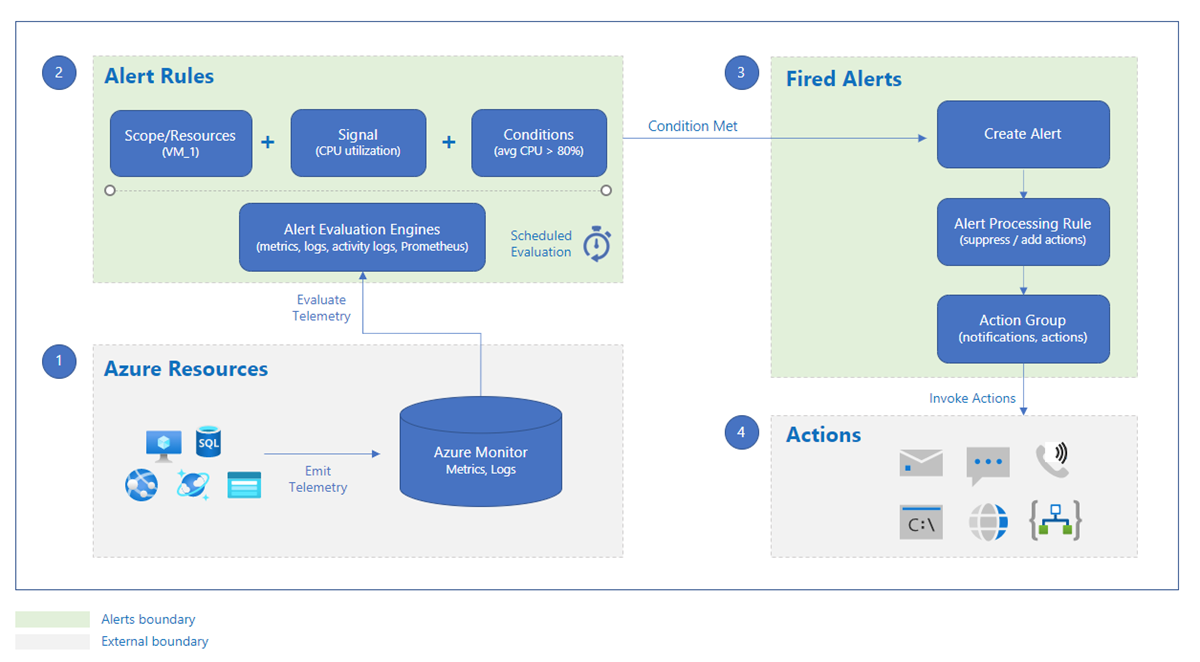
<p><img src="/assets/images/alerts.png" alt="&quot;alerts&quot;" title="alerts" />
ref: <a href="https://learn.microsoft.com/en-us/azure/azure-monitor/alerts/alerts-overview" target="\_blank" rel="nofollow">https://learn.microsoft.com/en-us/azure/azure-monitor/alerts/alerts-overview</a></p>

<h2 id="need-for-an-alerting-strategy">Need for an Alerting strategy</h2>

<p>A robust alerting strategy provides you a plan to structure your alerts and rules to manage various anomalies in the system. An alerting strategy defines the organization’s standards for:</p>

<ul>
  <li>The types of alert rules that you’ll create for different scenarios.</li>
  <li>How you’ll categorize and manage alerts after they’re created.</li>
  <li>Automated actions and notifications that you’ll take in response to alerts.</li>
</ul>

<h2 id="industry-frameworks">Industry frameworks</h2>

<p>Reviewing the popular methodologies of USE, RED, and the Four golden signals, you’ll find that they have requests, latency, and errors in common. Security and cost can be additions to this if they are measurable.</p>

<h3 id="the-four-golden-signals">The Four Golden Signals</h3>

<p>Rob Ewaschuk described <a href="https://sre.google/sre-book/monitoring-distributed-systems/#xref_monitoring_golden-signals" target="\_blank" rel="nofollow">the “four golden signals”</a> as the most important metrics to focus on at a high level. It was developed by Google’s SRE teams.</p>

<ul>
  <li>Latency
    <ul>
      <li>The time it takes to service a request.</li>
    </ul>
  </li>
  <li>Errors
    <ul>
      <li>The rate of requests that are not successful.</li>
    </ul>
  </li>
  <li>Traffic
    <ul>
      <li>A measure of how much demand is placed on your system.</li>
    </ul>
  </li>
  <li>Saturation
    <ul>
      <li>How full your service is.</li>
      <li>A measure of your system fraction, emphasizing the resources that are most constrained (Eg: In a memory-constrained system, show memory; in an I/O-constrained system, show I/O).</li>
    </ul>
  </li>
</ul>

<h3 id="the-red-method">The RED method</h3>

<p>For request-driven applications (like microservices), Tom Wilkie defined <a href="https://www.weave.works/blog/the-red-method-key-metrics-for-microservices-architecture/" target="\_blank" rel="nofollow">the RED Method</a>:</p>

<ul>
  <li>Rate
    <ul>
      <li>The number of requests per second a service is processing.</li>
    </ul>
  </li>
  <li>Errors
    <ul>
      <li>The number of failed requests per second.</li>
    </ul>
  </li>
  <li>Duration
    <ul>
      <li>Distributions of the amount of time each request takes.</li>
    </ul>
  </li>
</ul>

<h3 id="the-use-method">The USE method</h3>

<p>Brendan Gregg proposed <a href="https://www.brendangregg.com/usemethod.html" target="\_blank" rel="nofollow">the USE Method</a> for characterizing the performance of system resources:</p>

<ul>
  <li>Utilization
    <ul>
      <li>The average time that the resource was busy servicing work.</li>
    </ul>
  </li>
  <li>Saturation
    <ul>
      <li>The degree to which the resource has extra work that it can’t service, often queued.</li>
    </ul>
  </li>
  <li>Errors
    <ul>
      <li>The count of error events.</li>
    </ul>
  </li>
</ul>

<h2 id="cloud-alert-types">Cloud alert types</h2>

<p><strong>Metric alerts</strong></p>

<ul>
  <li>They are useful when you want to be alerted about data that requires little or no manipulation.</li>
  <li>Metric data is stored in the system already pre-computed, so metric alerts are less expensive than log alerts. Eg: database size alert.</li>
</ul>

<p><strong>Activity alerts</strong></p>

<ul>
  <li>Activity alerts provide auditing of all control plane actions that occurred on resources.</li>
  <li>Use activity alerts to be alerted when a specific event happens to a resource. Eg: Activity log alert on Azure. Eg: Create/Update/Delete Network Security Group in Azure.</li>
</ul>

<p><strong>Log alerts</strong></p>

<ul>
  <li>Log alerts allow you to perform advanced logic operations on your data.</li>
  <li>If the data you want to monitor is available in logs, or requires advanced logic, you can use the robust features of the querying language for data manipulation using log alerts.</li>
</ul>

<h2 id="prioritisation">Prioritisation</h2>

<p>Prioritisation allows the right alerts to show up as notifications and reduce the noise. One way of specifying the priority is by using a severity level that indicates how critical a situation is.</p>

<table>
  <thead>
    <tr>
      <th>Severity</th>
      <th>Description</th>
    </tr>
  </thead>
  <tbody>
    <tr>
      <td>Critical</td>
      <td>Loss of service or application availability or severe degradation of performance. Requires immediate attention.</td>
    </tr>
    <tr>
      <td>Error</td>
      <td>Degradation of performance or loss of availability of some aspect of an application or service. Requires attention but not immediate.</td>
    </tr>
    <tr>
      <td>Warning</td>
      <td>A problem that doesn’t include any current loss in availability or performance, although it has the potential to lead to more severe problems if unaddressed.</td>
    </tr>
    <tr>
      <td>Informational</td>
      <td>Doesn’t indicate a problem but provides interesting information to an operator, such as successful completion of a regular process.</td>
    </tr>
    <tr>
      <td>Verbose</td>
      <td>Detailed information that isn’t very useful.</td>
    </tr>
  </tbody>
</table>

<h2 id="channels">Channels</h2>

<ul>
  <li>Push to an app(Eg: Slack or PagerDuty).</li>
  <li>SMS messages.</li>
  <li>Voice messages.</li>
  <li>Email.</li>
</ul>

<h2 id="recipients">Recipients</h2>

<ul>
  <li>Many orgs out there have alerts going to a single cloud team. While this makes for an easy setup, it greatly increases the load as also the signal to noise ratio for the team.</li>
  <li>Discussing the different personas for the cloud is a topic better off as a seperate blog post. However let us talk about them from an alerts perspective. Some of the different personas possible within the Cloud Operations team:
    <ul>
      <li>Cloud Admins</li>
      <li>Platform team</li>
      <li>Site Reliability Engineers</li>
      <li>FinOps team</li>
      <li>SecOps
        <ul>
          <li>Cloud Security Leads</li>
          <li>Cloud Security Engineers</li>
        </ul>
      </li>
    </ul>
  </li>
  <li>Based on the real world teams which exist, the right “owners” can be set for the different alerts. Its the responsibility of the “owners” to follow through with the process and respond to the alerts. Eg: Budget alerts can go to the FinOps team.</li>
</ul>

<h2 id="use-case">Use case</h2>

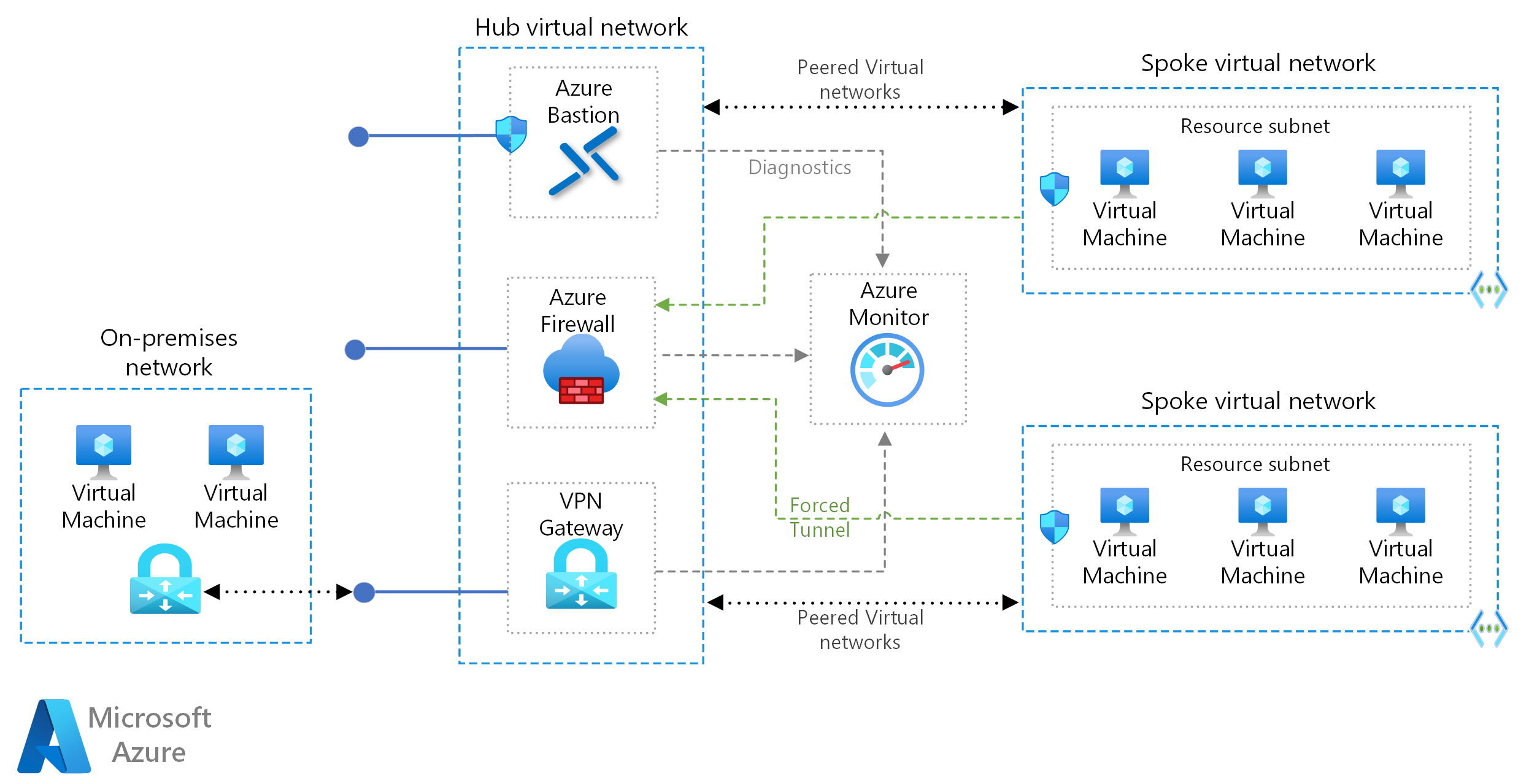
<p><img src="/assets/images/azure/hub-spoke.png" alt="&quot;Hub Spoke&quot;" title="Hub Spoke" /></p>

<ul>
  <li>An effective alerting strategy should be in line with the architecture of the cloud setup. If you take the below Hub spoke setup as an example, you can see which resources are critical for the uptime of the application.</li>
  <li>Examine each resource in this flow and apply the dimensions we discussed above. So examine each resource from left to the right - ie from the Firewall and VPN to the network peering to eventually the Virtual machine and database. Thus for each resource, you can:
    <ul>
      <li>Identity alerts for each resource. Plenty of docs available for this.</li>
      <li>Prioritise the alerts. SLA can be used to determine this.</li>
      <li>Assign the right channel based on priority. Eg: Assign the critical ones to something like PagerDuty or Slack or Teams to ensure timely response.</li>
      <li>Ensure the right people are assigned ownership of the alerts. SLA can be used to determine response process and urgency.</li>
    </ul>
  </li>
  <li>Here is an example of alerts for a virtual machine with suitable priority:
    <ul>
      <li>VM availability metric falls below 1 (Machine unavailable) - CRITICAL.</li>
      <li>Percentage CPU is greater than 80% - WARNING.</li>
      <li>Available Memory Bytes is less than 1 GB - WARNING.</li>
      <li>Data Disk IOPS Consumed Percentage is greater than 80% - WARNING.</li>
      <li>OS Disk IOPS Consumed Percentage is greater than 80% - WARNING.</li>
    </ul>
  </li>
</ul>

<h2 id="best-practices">Best practices</h2>

<p>The following points should be considered when configuring alerts:</p>

<ul>
  <li>Having well-defined owners is vital to optimizing operational effectiveness. Alerts can be set for non-technical notifications too. <br />
E.g. A budget owner should be made aware of capacity issues so that budgets can be adjusted and discussed.</li>
  <li>Instead of having teams actively monitor the systems and dashboard, send reliable alert notifications to the owners.</li>
  <li>Alerts should be configured for specific resource types adjusted to maximize signal to noise ratios. <br />
E.g. Only send a notification when a resource becomes unhealthy as per the defined requirements of the application health model or due to a cloud platform-initiated event.</li>
  <li>Consider transient issues when setting an appropriate threshold for resource unavailability. <br />
E.g. Configuring an alert for a virtual machine with a threshold of 1 minute for unavailability before an alert is triggered.</li>
  <li>Use an automated alerting solution instead of having people actively look for issues.</li>
  <li>Add a group email address rather than specific persons so as to reduce the need to update the notification settings with every team member’s changes.</li>
</ul>

<p>Takeaway - Use the steps given above to formulate a solid alerting strategy for your cloud setup. A “horses for courses” approach works really well to ensure a steady flow of alerts which isnt noisy.</p>

<h2 id="references">References</h2>

<ul>
  <li><a href="https://learn.microsoft.com/en-us/azure/azure-monitor/alerts/alerts-overview" target="\_blank" rel="nofollow">Azure Alerts overview</a></li>
  <li><a href="https://docs.aws.amazon.com/AmazonCloudWatch/latest/monitoring/AlarmThatSendsEmail.html" target="\_blank" rel="nofollow">Amazon CloudWatch alarms</a></li>
  <li><a href="https://learn.microsoft.com/en-us/azure/architecture/framework/devops/monitor-alerts" target="\_blank" rel="nofollow">Alerting for operations</a></li>
  <li><a href="https://learn.microsoft.com/en-us/azure/azure-monitor/best-practices-alerts" target="\_blank" rel="nofollow">Best practices alerts</a></li>
</ul>]]></content><author><name>Rohit Hegde</name></author><category term="cloud" /><category term="azure" /><category term="aws" /><category term="gcp" /><category term="monitoring" /><category term="strategy" /><summary type="html"><![CDATA[There arent much articles out there on alerting strategies. I found that out when I was developing one myself to implement a robust alerting system. Its been a couple of years since then and not much has changed. Some gems of knowledge on alerting remain in books but not widely published on the internet. This article is an attempt to address that gap.]]></summary></entry><entry><title type="html">HashiCorp Certified: Preparing for the Terraform Associate exam</title><link href="http://abstraction.blog/2023/06/07/hashicorp-terraform-associate-certification-preparation" rel="alternate" type="text/html" title="HashiCorp Certified: Preparing for the Terraform Associate exam" /><published>2023-06-07T00:00:00+05:30</published><updated>2023-06-07T00:00:00+05:30</updated><id>http://abstraction.blog/2023/06/07/hashicorp-terraform-associate-certification-preparation</id><content type="html" xml:base="http://abstraction.blog/2023/06/07/hashicorp-terraform-associate-certification-preparation"><![CDATA[<p>A brand new guide to prepare for the HashiCorp Certified: Terraform Associate (003) exam in 2023.</p>

<!-- TOC -->

<ul>
  <li><a href="#background">Background</a></li>
  <li><a href="#preparation">Preparation</a>
    <ul>
      <li><a href="#official-study-material">Official study material</a></li>
      <li><a href="#udemy-practice-tests-by-bryan-krausen">Udemy Practice tests by Bryan Krausen</a></li>
    </ul>
  </li>
  <li><a href="#scheduling-the-exam">Scheduling the exam</a></li>
  <li><a href="#pre-exam-process">Pre-exam process</a></li>
  <li><a href="#exam">Exam</a></li>
  <li><a href="#final-thoughts">Final thoughts</a></li>
</ul>

<!-- /TOC -->

<h2 id="background">Background</h2>

<blockquote>
  <p>“They give me questions I dont know. I give them answers they dont know” - Anonymous</p>
</blockquote>

<p>The <a href="https://www.hashicorp.com/certification/terraform-associate" target="\_blank" rel="nofollow">HashiCorp Certified: Terraform Associate exam</a> is ideal for Infrastructure and Ops engineers. I cleared the exam today ie June 8, 2023. I had previous given the 002 version of this exam around 2 yrs ago. You can read about my journey on other certifications <a href="http://abstraction.blog/#certification" target="\_blank">here</a>.</p>

<p>My experience as a Cloud Architect and hands-on cloud engineer gave me the confidence to go for this certification.</p>

<p><img src="/assets/images/certifications/terraform.png" alt="&quot;HashiCorp Certified: Terraform Associate&quot;" title="HashiCorp Certified: Terraform Associate" /></p>

<h2 id="preparation">Preparation</h2>

<h3 id="official-study-material">Official study material</h3>

<ul>
  <li>HashiCorp recommends those with Terraform experience to study with the <a href="https://developer.hashicorp.com/terraform/tutorials/certification-003/associate-review-003" target="\_blank" rel="nofollow">review guide</a> while those new to Terraform are better off with the <a href="https://developer.hashicorp.com/terraform/tutorials/certification-003/associate-study-003" target="\_blank" rel="nofollow">study guide</a>. Same content in both but the study guide has a better structure for learning from scratch.</li>
  <li>Those with Terraform experience should be able to breeze through the material in a weekend while those new will probably take a week or so.</li>
</ul>

<h3 id="udemy-practice-tests-by-bryan-krausen">Udemy Practice tests by Bryan Krausen</h3>

<ul>
  <li>I relied on a <a href="https://mckinsey.udemy.com/course/terraform-associate-practice-exam/" target="\_blank" rel="nofollow">set of 5 practice tests</a>.</li>
  <li>Similar to the actual certification exam, each test was hour long with 57 questions.</li>
  <li>I would give each exam + review the answers at the end to improve my score the next time. I was able to complete each test in half the time (30 min) every time.</li>
  <li>My scores were
    <ol>
      <li>82%</li>
      <li>84%</li>
      <li>87%</li>
      <li>84%</li>
      <li>89%</li>
    </ol>
  </li>
  <li>I was confident of doing well in the exams now.</li>
</ul>

<h2 id="scheduling-the-exam">Scheduling the exam</h2>

<p>I scheduled the exam through the <a href="https://www.hashicorp.com/certification/terraform-associate" target="\_blank" rel="nofollow">HashiCorp website</a> which eventually took me to PSI page.</p>

<h2 id="pre-exam-process">Pre-exam process</h2>

<p>I did the pre-exam prep below around 30 min before the exam :</p>

<ul>
  <li>I had to download a software which tested my machine for compatibility.</li>
  <li>Take a pic of my identity card.</li>
  <li>Take 15 sec videos of my surroundings.</li>
  <li>Take 15 sec video of my hands and ears.</li>
  <li>After another live 360 degrees scan from the Proctor, The exam was ready to begin.</li>
</ul>

<h2 id="exam">Exam</h2>

<ul>
  <li><strong>It was an exam of 1 hour with 57 questions and I needed 70% to pass</strong>.</li>
  <li>Similar to the practice tests, I started off on a quick note. I completed 20 questions every 10 min.</li>
  <li>It took me 30 minutes to complete 57 questions.</li>
  <li>I had flagged around 9 questions whose answer I wasnt sure of. Some of them had tricky language.</li>
  <li>I had to fill a survey on myself and nature of the exam after this (no impact on the exam results).</li>
  <li>I immediately received the congratulatory message page for clearing the exam along with the details of my performance. <strong>I got 86%</strong>.</li>
</ul>

<p>The certificate was added to <a href="https://www.credly.com/earner/earned" target="\_blank" rel="nofollow">Credly</a> in 48 hours.</p>

<h2 id="final-thoughts">Final thoughts</h2>

<p>This was the easiest online exam I have given. Focusing on the cli commands is the main ask. Highly recommended for all engineers who work with Infrastructure as Code (IaC) as its a quick win.</p>

<p>I wish you the best of luck if you plan on giving this exam :thumbsup:.
<br />Feel free to share your experiences. Every bit of knowledge helps :blush:.</p>]]></content><author><name>Rohit Hegde</name></author><category term="iac" /><category term="cloud" /><category term="certification" /><category term="terraform" /><summary type="html"><![CDATA[A brand new guide to prepare for the HashiCorp Certified: Terraform Associate (003) exam in 2023.]]></summary></entry><entry><title type="html">A crash course on Service Mesh</title><link href="http://abstraction.blog/2023/03/27/service-mesh-crash-course" rel="alternate" type="text/html" title="A crash course on Service Mesh" /><published>2023-03-27T00:00:00+05:30</published><updated>2023-03-27T00:00:00+05:30</updated><id>http://abstraction.blog/2023/03/27/service-mesh-crash-course</id><content type="html" xml:base="http://abstraction.blog/2023/03/27/service-mesh-crash-course"><![CDATA[<p>Like Kubernetes, the topic of service meshes can get quite complex once you get into the details of implementation. Based on my 3 years of experience with service meshes, I am attempting to simplify the journey of someone looking to makes sense of this vast topic.
This is related to my <a href="http://abstraction.blog/#kubernetes">Kubernetes series</a> of posts.</p>

<!-- TOC -->

<ul>
  <li><a href="#introduction">Introduction</a></li>
  <li><a href="#do-service-meshes-only-work-with-kubernetes">Do service meshes only work with Kubernetes?</a></li>
  <li><a href="#features">Features</a></li>
  <li><a href="#service-mesh-cons">Service mesh cons</a></li>
  <li><a href="#service-mesh-vs-event-mesh">Service mesh vs Event mesh</a></li>
  <li><a href="#service-mesh-architecture-types">Service mesh architecture types</a>
    <ul>
      <li><a href="#sidecar-proxy">Sidecar proxy</a></li>
      <li><a href="#host-based-proxy">Host based proxy</a></li>
      <li><a href="#ebpf-based">eBPF based</a></li>
    </ul>
  </li>
  <li><a href="#comparison-of-different-service-meshes">Comparison of different service meshes</a></li>
  <li><a href="#references">References</a></li>
</ul>

<!-- /TOC -->

<h2 id="introduction">Introduction</h2>

<ul>
  <li>At a high level, a service mesh ensures communication between applications.</li>
  <li>Specifically, a service mesh is a tool for adding observability, security, and reliability features to applications by inserting these features at the platform layer rather than the application layer (where libraries like Twitter’s Finagle, Netflix’s Hystrix, and Google’s Stubby were used).</li>
  <li>The term was introduced in 2016 by William Morgan, Buoyant CEO which eventually led to the creation of the Linkerd 1.0 service mesh. You can read his followup blog post <a href="https://linkerd.io/2017/04/25/whats-a-service-mesh-and-why-do-i-need-one/" target="\_blank" rel="nofollow">here</a>.</li>
</ul>

<h2 id="do-service-meshes-only-work-with-kubernetes">Do service meshes only work with Kubernetes?</h2>

<ul>
  <li>Service meshes are usually associated with Kubernetes. K8s network architecture and layered approach are well suited for service meshes.</li>
  <li>Some service meshes like <a href="https://linkerd.io/2.12/tasks/install/#requirements" target="\_blank" rel="nofollow">Linkerd 2.x work only with Kubernetes</a>. Others like <a href="https://istio.io/latest/docs/ops/deployment/vm-architecture/" target="\_blank" rel="nofollow">Istio</a>, <a href="https://developer.hashicorp.com/consul/tutorials/developer-mesh/service-mesh-deploy-vms" target="\_blank" rel="nofollow">Consul</a> and <a href="https://cilium.io/blog/2020/11/10/cilium-19/" target="\_blank" rel="nofollow">Cilium</a> can work with applications deployed on Virtual Machines too though the setup will likely involve some additional effort.</li>
</ul>

<h2 id="features">Features</h2>

<ul>
  <li>Observability
    <ul>
      <li>Organizations can get observability support (e.g., metrics, logs, and traces) as well as dependency or service graphs for each of their services (microservice or not), as they adopt a service mesh.</li>
    </ul>
  </li>
  <li>Security
    <ul>
      <li>A service mesh can help in setting up a zero trust security model.</li>
      <li>Authentication, authorization and encrypting traffic between services(mTLS) can be taken up by a service mesh.</li>
      <li>Most service meshes provide a certificate authority (CA) to manage keys and certificates for securing service-to-service communication.</li>
    </ul>
  </li>
  <li>Reliability
    <ul>
      <li>Resiliency features typically include circuit-breaking, latency-aware load balancing, eventually consistent service discovery, retries, timeouts, and deadlines.</li>
      <li>Service meshes also safeguard service reliability by enforcing a timeout on long-running requests. It can ensure services don’t get overloaded by utilizing techniques like circuit breaking.</li>
    </ul>
  </li>
</ul>

<h2 id="service-mesh-cons">Service mesh cons</h2>

<ul>
  <li>Some service meshes can be quite resource heavy(eg: <a href="https://istio.io/v1.8/docs/ops/deployment/performance-and-scalability/" target="\_blank" rel="nofollow">Istiod uses 1 vCPU and 1.5 GB of memory</a>).</li>
  <li>Additional network hops for the traffic.</li>
  <li>Operational complexity can significantly rise for some service meshes wth high learning curve.</li>
  <li>With increase in maturity in k8s and in network CNIs, a number of features are already present and your dependency on service mesh may not be as as much as before.</li>
</ul>

<h2 id="service-mesh-vs-event-mesh">Service mesh vs Event mesh</h2>

<p>Event mesh and service mesh complement each other in the enterprise by providing two different but effective communication options.</p>

<ul>
  <li>Event mesh connects not only microservices but also legacy applications, cloud-native services, devices, and data sources/sinks. These can operate both in cloud and non-cloud environments.</li>
  <li>While event mesh is asynchronous, service mesh supports more traditional synchronous request-reply messaging.</li>
</ul>

<h2 id="service-mesh-architecture-types">Service mesh architecture types</h2>

<h3 id="sidecar-proxy">Sidecar proxy</h3>

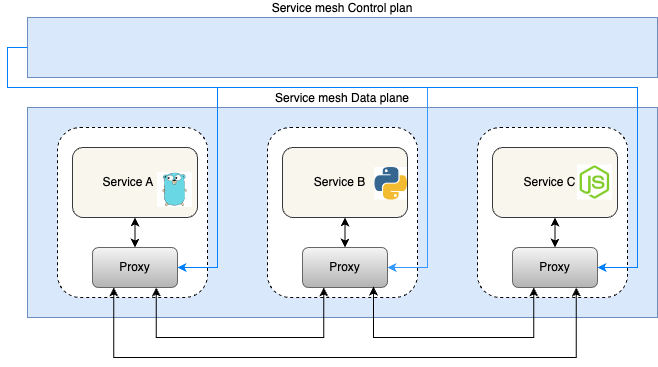
<p><img src="/assets/images/service-mesh/service-mesh.png" alt="&quot;service-mesh-sidecar&quot;" title="service-mesh-sidecar" /></p>

<ul>
  <li>The most popular pattern for implementing a service mesh is the <a href="https://learn.microsoft.com/en-us/azure/architecture/patterns/sidecar" target="\_blank" rel="nofollow">sidecar pattern</a>.</li>
  <li>It involves deploying a network proxy for every service instance which handles all communication between the services. This is part of the service mesh data plane which is controlled by the mesh control plane.</li>
  <li>Many service meshes like Istio, Consul, Cilium use <a href="https://github.com/envoyproxy/envoy" target="\_blank" rel="nofollow">Envoy</a> as proxy.</li>
</ul>

<h3 id="host-based-proxy">Host based proxy</h3>

<ul>
  <li>A host based proxy approach involves using a shared agent running on each node/vm of a cluster as proxy.</li>
  <li>It supposed to be a leaner alternative to the sidecar approach as Envoy based sidecars require a fair bit of resources to run (eg: <a href="https://istio.io/v1.8/docs/ops/deployment/performance-and-scalability/" target="\_blank" rel="nofollow">Istiod uses 1 vCPU and 1.5 GB of memory</a>).</li>
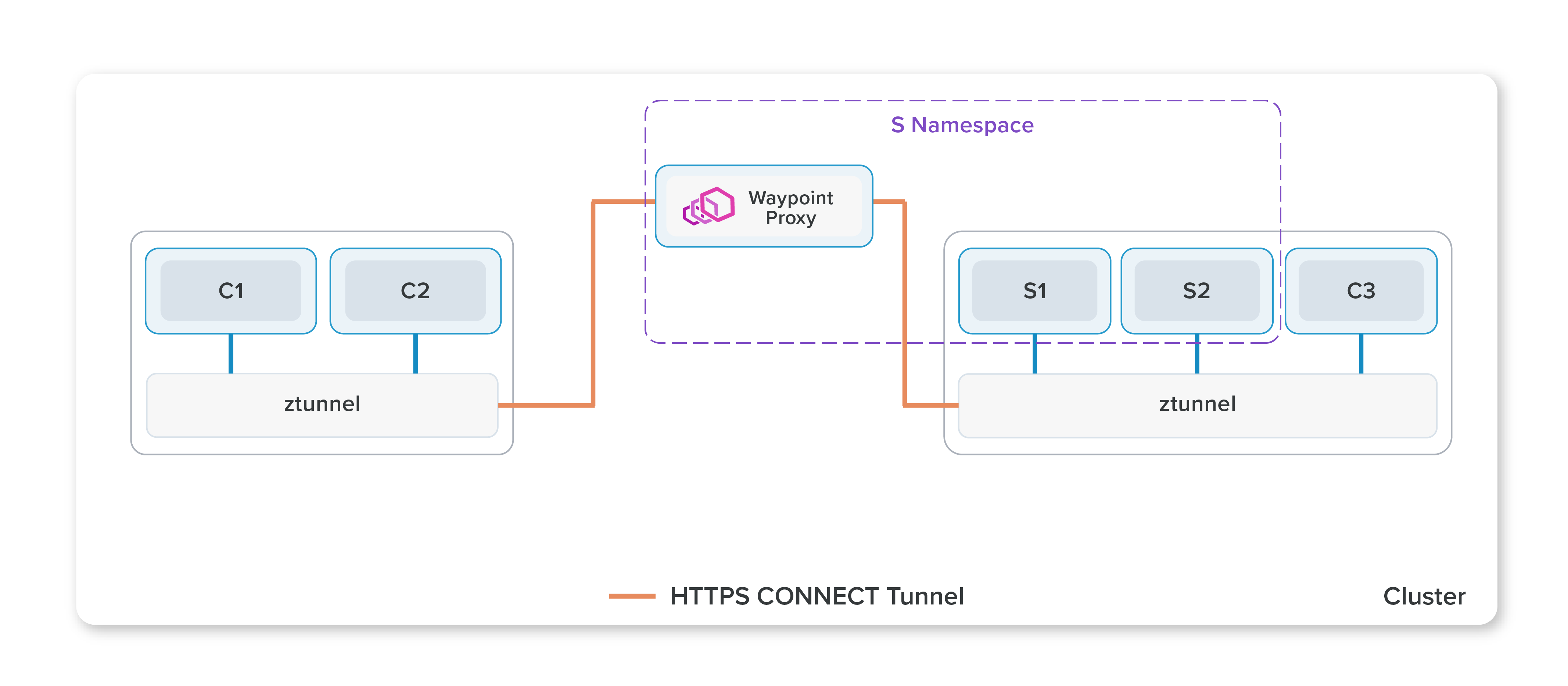
  <li>There are service meshes out there who use host based proxy along with sidecar based proxy for better security and division of responsibilities. Eg: <a href="https://istio.io/latest/blog/2022/introducing-ambient-mesh/" target="\_blank" rel="nofollow">Istio’s new Ambient mesh</a> (this mode is <a href="https://github.com/istio/istio/tree/experimental-ambient#limitations" target="\_blank" rel="nofollow">not ready for production yet</a> though).</li>
</ul>

<p>Istio’s Ambient mesh which uses both host based(ztunnel) and sidecar proxy(waypoint):
<img src="/assets/images/service-mesh/istio-ambient-mesh.png" alt="&quot;istio-ambient-mesh&quot;" title="istio-ambient-mesh" /></p>

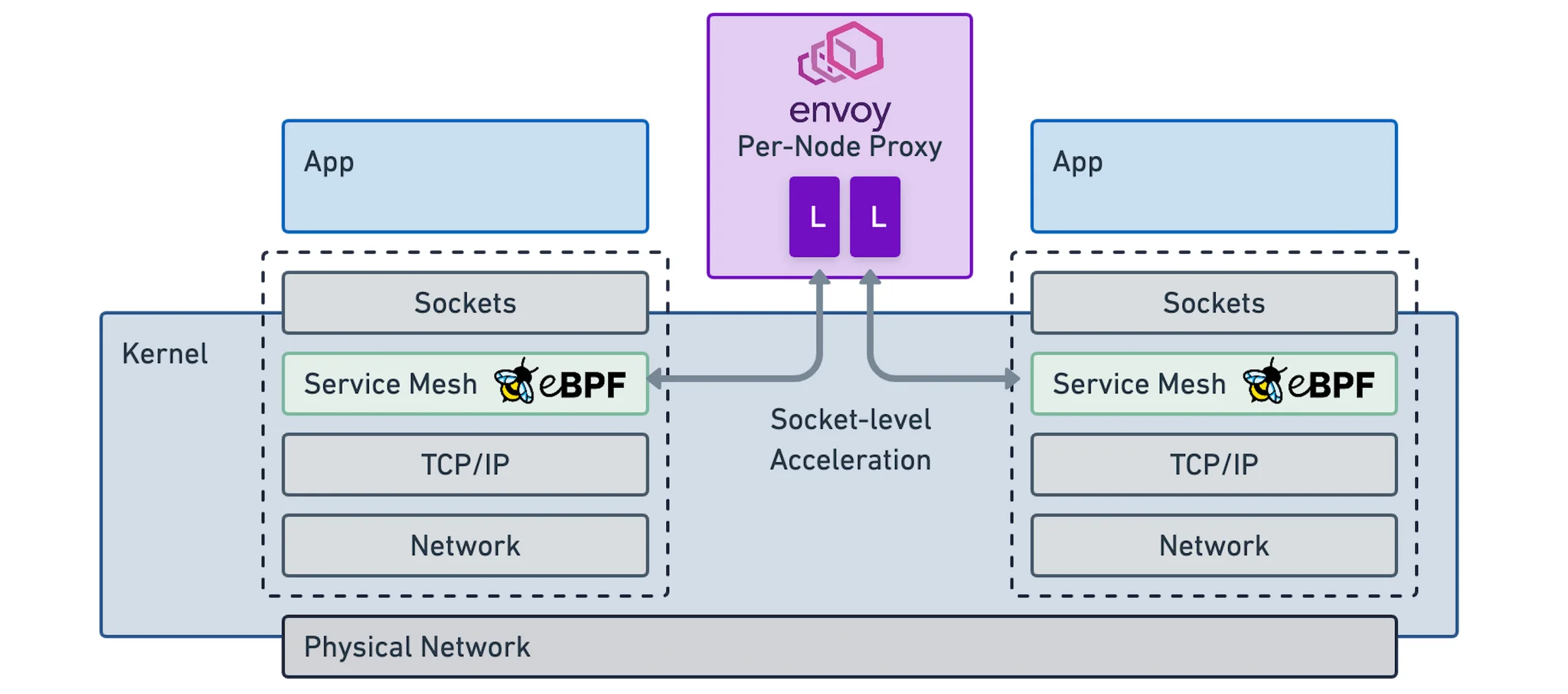
<h3 id="ebpf-based">eBPF based</h3>

<p>Isovalent’s <a href="https://isovalent.com/blog/post/2021-12-08-ebpf-servicemesh/" target="\_blank" rel="nofollow">Cilium service mesh architecture</a>:
<img src="/assets/images/service-mesh/ebpf-service-mesh.webp" alt="&quot;ebpf-service-mesh&quot;" title="ebpf-service-mesh" /></p>

<ul>
  <li>Extended Berkeley Packet Filter (eBPF) is a feature of the Linux kernel that allows applications to do certain types of work in the kernel itself. eBPF can be used to replace iptables rules, and accelerate the data plane by shortening the data path.</li>
  <li>There are efforts being made with eBPF to have an improved performance with sidecar free service meshes. Currently <a href="https://isovalent.com/blog/post/cilium-service-mesh/" target="\_blank" rel="nofollow">Cilium</a> is a service mesh which uses eBPF and a node based proxy(Envoy). Istio is also experimenting on this with <a href="https://istio.io/latest/blog/2022/merbridge/" target="\_blank" rel="nofollow">Merbridge</a>.</li>
  <li>The Linux kernel has decades of features and safeguards in it. <a href="https://buoyant.io/blog/ebpf-sidecars-and-the-future-of-the-service-mesh" target="\_blank" rel="nofollow">It looks difficult to have all proxy features of a service mesh in the kernel with eBPF</a>(especially layer 7 features) but many organisations are looking into using eBPF for optimisation. We need to wait and watch to see how the winds blow here.</li>
</ul>

<h2 id="comparison-of-different-service-meshes">Comparison of different service meshes</h2>

<p>The below table compares 4 prominent service meshes. For others you can look at <a href="https://servicemesh.es/" target="\_blank" rel="nofollow">https://servicemesh.es/</a>(very detailed with a bit of outdated info and lesser meshes) or <a href="https://layer5.io/service-mesh-landscape" target="\_blank" rel="nofollow">https://layer5.io/service-mesh-landscape</a>.</p>

<table>
  <thead>
    <tr>
      <th>Factor</th>
      <th style="text-align: left">Istio</th>
      <th style="text-align: left">Linkerd2</th>
      <th style="text-align: left">Consul Connect</th>
      <th style="text-align: left">Cilium</th>
    </tr>
  </thead>
  <tbody>
    <tr>
      <td>First stable release</td>
      <td style="text-align: left">31 Jul 2018</td>
      <td style="text-align: left">18 Sep 2018</td>
      <td style="text-align: left">16 Oct 2017</td>
      <td style="text-align: left">24 Apr 2018</td>
    </tr>
    <tr>
      <td>Repository</td>
      <td style="text-align: left"><a href="https://github.com/istio/istio&gt;" target="\_blank" rel="nofollow">Istio</a></td>
      <td style="text-align: left"><a href="https://github.com/linkerd/linkerd2" target="\_blank" rel="nofollow">Linkerd 2.0</a></td>
      <td style="text-align: left"><a href="https://github.com/hashicorp/consul" target="\_blank" rel="nofollow">Consul</a></td>
      <td style="text-align: left"><a href="https://github.com/cilium/cilium" target="\_blank" rel="nofollow">Cilium</a></td>
    </tr>
    <tr>
      <td>Language</td>
      <td style="text-align: left">go (control plane), C++(data plane ie Envoy)</td>
      <td style="text-align: left">go (control plane), rust (data plane)</td>
      <td style="text-align: left">go</td>
      <td style="text-align: left">go</td>
    </tr>
    <tr>
      <td>Supporting organizations</td>
      <td style="text-align: left">Lyft, Google, IBM, Microsoft</td>
      <td style="text-align: left">Cloud Native Foundation (CNCF)</td>
      <td style="text-align: left">HashiCorp</td>
      <td style="text-align: left">Isovalent</td>
    </tr>
    <tr>
      <td>Workloads</td>
      <td style="text-align: left">Kubernetes + VMs</td>
      <td style="text-align: left">Kubernetes only</td>
      <td style="text-align: left">Kubernetes + VMs</td>
      <td style="text-align: left">Kubernetes + VMs</td>
    </tr>
    <tr>
      <td>Architecture : Single point of failure</td>
      <td style="text-align: left">No – uses sidecar per pod</td>
      <td style="text-align: left">No</td>
      <td style="text-align: left">No</td>
      <td style="text-align: left">Partial - node proxy makes the services in affected node vulnerable</td>
    </tr>
    <tr>
      <td>Architecture : Proxy</td>
      <td style="text-align: left">Sidecar proxy (customised Envoy)</td>
      <td style="text-align: left">Sidecar proxy (Linkerd2-proxy)</td>
      <td style="text-align: left">Sidecar proxy (Envoy)</td>
      <td style="text-align: left">eBPF + node proxy (Envoy)</td>
    </tr>
    <tr>
      <td>Architecture : Security</td>
      <td style="text-align: left">Sidecar approach ensures high security.</td>
      <td style="text-align: left">Sidecar approach ensures high security.</td>
      <td style="text-align: left">Sidecar approach ensures high security.</td>
      <td style="text-align: left">Host proxy approach isnt considered as secure.</td>
    </tr>
    <tr>
      <td>mTLS</td>
      <td style="text-align: left">Yes</td>
      <td style="text-align: left">Yes</td>
      <td style="text-align: left">Yes</td>
      <td style="text-align: left">Yes</td>
    </tr>
    <tr>
      <td>Security : Certificate Management</td>
      <td style="text-align: left">Yes</td>
      <td style="text-align: left">Yes</td>
      <td style="text-align: left">Yes (with Vault integration)</td>
      <td style="text-align: left">Yes</td>
    </tr>
    <tr>
      <td>Communication Protocols</td>
      <td style="text-align: left">TCP, HTTP/1.x, HTTP/2, gRPC</td>
      <td style="text-align: left">TCP, HTTP/1.x, HTTP/2, gRPC</td>
      <td style="text-align: left">TCP, HTTP/1.x, HTTP/2, gRPC</td>
      <td style="text-align: left">TCP, HTTP/1.x, HTTP/2, gRPC</td>
    </tr>
    <tr>
      <td>Traffic Management</td>
      <td style="text-align: left">Blue/Green Deployments, Circuit Breaking, Fault Injection, Rate Limiting</td>
      <td style="text-align: left">Blue/Green Deployments, Fault Injection</td>
      <td style="text-align: left">Blue/Green Deployments, Circuit Breaking, Fault Injection, Rate Limiting</td>
      <td style="text-align: left">Blue/Green Deployments, Circuit Breaking, Fault Injection, Rate Limiting</td>
    </tr>
    <tr>
      <td>Multicluster Support</td>
      <td style="text-align: left">Yes</td>
      <td style="text-align: left">Yes</td>
      <td style="text-align: left">Yes</td>
      <td style="text-align: left">Yes</td>
    </tr>
    <tr>
      <td>Ingress</td>
      <td style="text-align: left">Istio gateway or Nginx ingress controller</td>
      <td style="text-align: left">Any</td>
      <td style="text-align: left">Envoy and Ambassador</td>
      <td style="text-align: left">Any</td>
    </tr>
    <tr>
      <td>Operations Complexity</td>
      <td style="text-align: left">High</td>
      <td style="text-align: left">Low</td>
      <td style="text-align: left">Medium</td>
      <td style="text-align: left">Medium (debugging with eBPF can be hard)</td>
    </tr>
    <tr>
      <td>Learning curve</td>
      <td style="text-align: left">High</td>
      <td style="text-align: left">Medium</td>
      <td style="text-align: left">High (plenty of moving parts)</td>
      <td style="text-align: left">Medium</td>
    </tr>
    <tr>
      <td>Resources footprint</td>
      <td style="text-align: left">High</td>
      <td style="text-align: left">Medium</td>
      <td style="text-align: left">High</td>
      <td style="text-align: left">Low</td>
    </tr>
    <tr>
      <td>Support</td>
      <td style="text-align: left">Largest community support</td>
      <td style="text-align: left">Large community support + Enterprise support</td>
      <td style="text-align: left">Solid Enterprise support</td>
      <td style="text-align: left">Community support + Enterprise support</td>
    </tr>
  </tbody>
</table>

<h2 id="references">References</h2>

<ul>
  <li><a href="https://linkerd.io/what-is-a-service-mesh/" target="\_blank" rel="nofollow">https://linkerd.io/what-is-a-service-mesh/</a></li>
  <li><a href="https://konghq.com/learning-center/service-mesh/what-is-a-service-mesh" target="\_blank" rel="nofollow">https://konghq.com/learning-center/service-mesh/what-is-a-service-mesh</a></li>
  <li><a href="https://isovalent.com/blog/post/addressing-bandwidth-exhaustion-with-cilium-bandwidth-manager/" target="\_blank" rel="nofollow">https://isovalent.com/blog/post/addressing-bandwidth-exhaustion-with-cilium-bandwidth-manager/</a></li>
  <li><a href="https://medium.com/elca-it/service-mesh-performance-evaluation-istio-linkerd-kuma-and-consul-d8a89390d630" target="\_blank" rel="nofollow">https://medium.com/elca-it/service-mesh-performance-evaluation-istio-linkerd-kuma-and-consul-d8a89390d630</a></li>
  <li><a href="https://www.toptal.com/kubernetes/service-mesh-comparison" target="\_blank" rel="nofollow">https://www.toptal.com/kubernetes/service-mesh-comparison</a></li>
</ul>]]></content><author><name>Rohit Hegde</name></author><category term="kubernetes" /><category term="guide" /><category term="istio" /><category term="linkerd" /><category term="microservices" /><category term="network" /><category term="proxy" /><category term="tutorial" /><summary type="html"><![CDATA[Like Kubernetes, the topic of service meshes can get quite complex once you get into the details of implementation. Based on my 3 years of experience with service meshes, I am attempting to simplify the journey of someone looking to makes sense of this vast topic. This is related to my Kubernetes series of posts.]]></summary></entry><entry><title type="html">A crash course on Kubernetes resources</title><link href="http://abstraction.blog/2023/02/28/kubernetes-resources-crash-course" rel="alternate" type="text/html" title="A crash course on Kubernetes resources" /><published>2023-02-28T00:00:00+05:30</published><updated>2023-02-28T00:00:00+05:30</updated><id>http://abstraction.blog/2023/02/28/kubernetes-resources-crash-course</id><content type="html" xml:base="http://abstraction.blog/2023/02/28/kubernetes-resources-crash-course"><![CDATA[<p>I have been working on Kubernetes for 5+ years now. But started blogging on my fav tech topic only now. This post focuses on the basic resources of k8s. The target audience are those who just want to know enough k8s to deploy basic containerised apps/microservices to the k8s cluster. This allows me to focus on the basic k8s resources.</p>

<p>This is part of my <a href="http://abstraction.blog/#kubernetes">Kubernetes series</a> of posts.</p>

<!-- TOC -->

<ul>
  <li><a href="#using-a-kubernetes-cluster">Using a Kubernetes cluster</a>
    <ul>
      <li><a href="#cluster-setup">Cluster setup</a></li>
      <li><a href="#kubectl">Kubectl</a></li>
      <li><a href="#imperative-approach">Imperative approach</a></li>
      <li><a href="#declarative-approach">Declarative approach</a></li>
    </ul>
  </li>
  <li><a href="#kubernetes-architecture">Kubernetes Architecture</a>
    <ul>
      <li><a href="#control-plane">Control Plane</a></li>
      <li><a href="#worker-nodes">Worker Nodes</a></li>
    </ul>
  </li>
  <li><a href="#kubernetes-objects">Kubernetes objects</a>
    <ul>
      <li><a href="#namespace">Namespace</a></li>
      <li><a href="#pod">Pod</a></li>
      <li><a href="#deployment">Deployment</a></li>
      <li><a href="#service">Service</a></li>
      <li><a href="#labels-and-selectors">Labels and selectors</a></li>
      <li><a href="#configmap">ConfigMap</a></li>
      <li><a href="#secret">Secret</a></li>
    </ul>
  </li>
  <li><a href="#related-tools">Related tools</a>
    <ul>
      <li><a href="#helm">Helm</a></li>
      <li><a href="#k9s">k9s</a></li>
    </ul>
  </li>
  <li><a href="#whats-next-">Whats next ?</a></li>
</ul>

<!-- /TOC -->

<h2 id="using-a-kubernetes-cluster">Using a Kubernetes cluster</h2>

<h3 id="cluster-setup">Cluster setup</h3>

<p>Before going into the internal k8s objects, you will need a k8s cluster to try out commands given in the next section. Use any of the below options given in an ascending order of complexity:</p>

<ol>
  <li>Use a free online k8s cluster at <a href="https://killercoda.com/playgrounds/scenario/kubernetes" target="\_blank" rel="nofollow">KillerCoda</a>.</li>
  <li>Use a free online k8s cluster at <a href="https://kubernetes.io/docs/tutorials/kubernetes-basics/create-cluster/cluster-interactive/" target="\_blank" rel="nofollow">Kubernetes.io</a>.</li>
  <li>Setup a k8s cluster on your local machine through one click by using <a href="https://www.docker.com/products/docker-desktop/" target="\_blank" rel="nofollow">Docker Desktop</a>.</li>
  <li>Setup <a href="https://minikube.sigs.k8s.io/docs/start/" target="\_blank" rel="nofollow">MiniKube</a> on your local machine.</li>
  <li>Provision a managed Kubernetes cluster on any of the cloud providers and use it. Eg: <a href="https://learn.microsoft.com/en-us/azure/aks/learn/quick-kubernetes-deploy-portal?tabs=azure-cli" target="\_blank" rel="nofollow">Azure Kubernetes Service</a>.</li>
  <li>Install k8s using a Platform as a Service (PaaS) offering like <a href="https://docs.openshift.com/container-platform/latest/installing/installing-preparing.html" target="\_blank" rel="nofollow">OpenShift</a>.</li>
  <li>Install k8s on a barebones virtual machine by <a href="https://kubernetes.io/docs/setup/production-environment/tools/kubeadm/install-kubeadm/" target="\_blank" rel="nofollow">installing KubeAdm</a> and <a href="https://kubernetes.io/docs/setup/production-environment/tools/kubeadm/create-cluster-kubeadm/" target="\_blank" rel="nofollow">using KubeAdm to create the cluster</a>.</li>
</ol>

<h3 id="kubectl">Kubectl</h3>

<p>Install <a href="https://kubernetes.io/docs/tasks/tools/#kubectl" target="\_blank" rel="nofollow">Kubectl</a> if you plan to run CLI commands from your local machine against the k8s cluster.
Add the below alias in your <code class="language-plaintext highlighter-rouge">~/.bashrc</code> file as you will be likely use kubectl a lot atleast in the initial days of trying out k8s.</p>

<div class="language-bash highlighter-rouge"><div class="highlight"><pre class="highlight"><code><span class="nb">alias </span><span class="nv">k</span><span class="o">=</span><span class="s1">'kubectl'</span>
</code></pre></div></div>

<p>Depending on the type of cluster you have installed above, there are different commands to setup a connection to the cluster. If you are connecting from your local terminal, the credentials will likely be stored in the <code class="language-plaintext highlighter-rouge">~/.kubeconfig</code> file. Read <a href="https://ahmet.im/blog/mastering-kubeconfig/" target="\_blank" rel="nofollow">this article for more details on kubeconfig</a>.</p>

<h3 id="imperative-approach">Imperative approach</h3>

<p>Kubernetes objects can quickly be created, updated, and deleted directly using imperative commands built into the kubectl command-line tool. For more details, you can visit <a href="https://kubernetes.io/docs/tasks/manage-kubernetes-objects/imperative-command/" target="\_blank" rel="nofollow">the official docs on it</a>. Eg:</p>

<div class="language-bash highlighter-rouge"><div class="highlight"><pre class="highlight"><code>kubectl get nodes
</code></pre></div></div>

<h3 id="declarative-approach">Declarative approach</h3>

<ul>
  <li>Kubernetes objects can be created, updated, and deleted by storing multiple object configuration files in a directory and using <code class="language-plaintext highlighter-rouge">kubectl apply</code> to recursively create and update those objects as needed. Such config files are called manifests.</li>
  <li>Kubernetes resources are usually created by posting a JSON or YAML manifest to the Kubernetes REST API endpoint.</li>
  <li>The yaml file usually consists of the following attributes:
    <ul>
      <li><code class="language-plaintext highlighter-rouge">apiVersion</code> - This is the k8s API version which supports the specific resource. We can get the right api version using either the command <code class="language-plaintext highlighter-rouge">kubectl api-resources</code>. Alternatively you can always copy the right yaml from the official documentation.</li>
      <li><code class="language-plaintext highlighter-rouge">kind</code> - This indicates the resource to access.</li>
      <li><code class="language-plaintext highlighter-rouge">metadata</code> - This is an metadata object having attributes like name, labels, annotations etc.</li>
    </ul>
  </li>
</ul>

<p>ns.yaml:</p>

<div class="language-yaml highlighter-rouge"><div class="highlight"><pre class="highlight"><code><span class="na">apiVersion</span><span class="pi">:</span> <span class="s">v1</span>
<span class="na">kind</span><span class="pi">:</span> <span class="s">Namespace</span>
<span class="na">metadata</span><span class="pi">:</span>
  <span class="na">name</span><span class="pi">:</span> <span class="s">test1</span>
</code></pre></div></div>

<div class="language-bash highlighter-rouge"><div class="highlight"><pre class="highlight"><code>kubectl apply <span class="nt">-f</span> ns.yaml
</code></pre></div></div>

<h2 id="kubernetes-architecture">Kubernetes Architecture</h2>

<p>Read this section only if you are really curious on what makes k8s work. Not necessary if you just want to deploy your app on the cluster.</p>

<p><img src="/assets/images/k8s/k8s-architecture.drawio.png" alt="&quot;k8s-architecture&quot;" title="k8s-architecture" /></p>

<h3 id="control-plane">Control Plane</h3>

<ul>
  <li>The Control Plane is what controls the cluster and makes it function.</li>
  <li>In a managed k8s cluster, you will not be able to access this part as its controlled by the clodu provider.</li>
  <li>You can remember the different parts of the control pane with the acronym <strong>CASE</strong>:
    <ul>
      <li>Controller
        <ul>
          <li>It replicates apps, keeping track of worker nodes, handling node failures, and so on.</li>
        </ul>
      </li>
      <li>API Server
        <ul>
          <li>This is the endpoint which every resource in k8s communicates with. You can see the mediator design pattern in play here.</li>
          <li>The API server itself communicates on its own to some parts of the cluster too.</li>
        </ul>
      </li>
      <li>Scheduler
        <ul>
          <li>It schedules your apps by assigning thr suitable node to it.</li>
        </ul>
      </li>
      <li>etcd
        <ul>
          <li>This is the persistent data store which stores the cluster state.</li>
          <li>Its a <a href="https://github.com/etcd-io/etcd" target="\_blank" rel="nofollow">popular open source tool</a>.</li>
        </ul>
      </li>
    </ul>
  </li>
</ul>

<h3 id="worker-nodes">Worker Nodes</h3>

<ul>
  <li>Nodes are the compute resources which power the cluster. But generally, when we talk about nodes, we consider them as worker nodes ie distinct from nodes which power the control plane.</li>
  <li>The worker nodes are the machines that run your containerized applications (right side of the diagram)</li>
  <li>The different parts of the worker node are :
    <ul>
      <li>Kubelet
        <ul>
          <li>This talks to the API server and manages containers on this node.</li>
        </ul>
      </li>
      <li>Kube proxy
        <ul>
          <li>This is the k8s service proxy which load balances network traffic between application components.</li>
        </ul>
      </li>
      <li>Container runtime
        <ul>
          <li>This runs the containers.</li>
          <li>Towards the end of 2020, <a href="https://kubernetes.io/blog/2020/12/02/dont-panic-kubernetes-and-docker/" target="\_blank" rel="nofollow">Docker as an underlying runtime was deprecated</a> in favor of runtimes like containerd that use the Container Runtime Interface (CRI). Don’t worry if your app image was created via Docker though. It will continue to work in k8s as its an OCI (Open Container Initiative) image.</li>
        </ul>
      </li>
    </ul>
  </li>
</ul>

<h2 id="kubernetes-objects">Kubernetes objects</h2>

<p>This is a basic list of k8s resources. There are plenty of resources not mentioned here (jobs, cronjobs, daemonsets, crd etc) but which are needed for advanced scenarios and thus out of scope of this guide.g</p>

<h3 id="namespace">Namespace</h3>

<ul>
  <li>Similar to namespaces in other programming languages - Namespaces are a way to divide cluster resources between multiple users or environments. However they don’t provide any isolation for the running objects. For isolation, you will have to use more complex resources like <a href="https://kubernetes.io/docs/concepts/services-networking/network-policies/" target="\_blank" rel="nofollow">network policies</a>.</li>
  <li>The default namespaces in a k8s cluster are:
    <ul>
      <li><code class="language-plaintext highlighter-rouge">default</code> - This is the default namespace. Not recommended for production.</li>
      <li><code class="language-plaintext highlighter-rouge">kube-node-lease</code> - It holds Lease objects associated with each node. It helps the control plane detect node failure.</li>
      <li><code class="language-plaintext highlighter-rouge">kube-public</code> - Its reserved for cluster usage in case that some resources should be visible and readable publicly throughout the whole cluster.</li>
      <li><code class="language-plaintext highlighter-rouge">kube-system</code> - For objects created by the Kubernetes system.</li>
    </ul>
  </li>
  <li>Visit <a href="https://kubernetes.io/docs/concepts/overview/working-with-objects/namespaces/" target="\_blank" rel="nofollow">this link</a> for the official docs on namespaces.</li>
</ul>

<p>Imperative cmds:</p>

<div class="language-bash highlighter-rouge"><div class="highlight"><pre class="highlight"><code>kubectl create namespace test1
kubectl create namespace test2
kubectl get namespace
kubectl get namespace test2
kubectl delete namespace test2
</code></pre></div></div>

<p>Yaml for declarative approach:</p>

<div class="language-yaml highlighter-rouge"><div class="highlight"><pre class="highlight"><code><span class="na">apiVersion</span><span class="pi">:</span> <span class="s">v1</span>
<span class="na">kind</span><span class="pi">:</span> <span class="s">Namespace</span>
<span class="na">metadata</span><span class="pi">:</span>
  <span class="na">name</span><span class="pi">:</span> <span class="s">test1</span>
</code></pre></div></div>

<h3 id="pod">Pod</h3>

<ul>
  <li>It is the basic building block in k8s.</li>
  <li>A pod is a group of one or more related application containers that will always run together on the same worker node and in the same Linux namespace.</li>
  <li>Visit <a href="https://kubernetes.io/docs/concepts/workloads/pods/" target="\_blank" rel="nofollow">this link</a> for the official docs on pods.</li>
</ul>

<p>Imperative cmds:</p>

<div class="language-bash highlighter-rouge"><div class="highlight"><pre class="highlight"><code><span class="c"># Single namespace cmds</span>
kubectl get pods                              <span class="c"># List all pods in the namespace</span>
kubectl get pods <span class="nt">-o</span> wide                      <span class="c"># List all pods with more details</span>
kubectl get pods <span class="nt">--namespace</span> custom-namespace <span class="c"># List all pods of another namespace</span>
kubectl get pods <span class="nt">-n</span> custom-namespace          <span class="c"># List all pods of another namespace</span>
kubectl get pod pod1 <span class="nt">-o</span> yaml                  <span class="c"># Get a pod's YAML</span>
kubectl explain pods                          <span class="c"># get the documentation for pod manifests</span>
kubectl edit pod pod1                         <span class="c"># Edit a running pod</span>
kubectl delete pod pod1 pod2                  <span class="c"># Delete 2 pods</span>
<span class="c"># Commands on all namespaces</span>
kubectl get pods <span class="nt">--all-namespaces</span>             <span class="c"># List all pods in all namespaces</span>
kubectl delete pods <span class="nt">--all-namespaces</span>          <span class="c"># Delete all pods in all namespaces</span>
</code></pre></div></div>

<p>Yaml for declarative approach:</p>

<div class="language-yaml highlighter-rouge"><div class="highlight"><pre class="highlight"><code><span class="na">apiVersion</span><span class="pi">:</span> <span class="s">v1</span>
<span class="na">kind</span><span class="pi">:</span> <span class="s">Pod</span>
<span class="na">metadata</span><span class="pi">:</span>
  <span class="na">name</span><span class="pi">:</span> <span class="s">nginx</span>
<span class="na">spec</span><span class="pi">:</span>
  <span class="na">containers</span><span class="pi">:</span>
    <span class="pi">-</span> <span class="na">name</span><span class="pi">:</span> <span class="s">nginx</span>
      <span class="na">image</span><span class="pi">:</span> <span class="s">nginx:1.14.2</span>
      <span class="na">ports</span><span class="pi">:</span>
        <span class="pi">-</span> <span class="na">containerPort</span><span class="pi">:</span> <span class="m">80</span>
</code></pre></div></div>

<h3 id="deployment">Deployment</h3>

<ul>
  <li>It is a higher-level resource meant for deploying applications and updating them declaratively.</li>
  <li>A Deployment provides declarative updates for Pods. You can decide how many instances of a pod you want by setting the replicas. More on using this in the “Services” section.</li>
  <li>Visit <a href="https://kubernetes.io/docs/concepts/workloads/controllers/deployment/" target="\_blank" rel="nofollow">this link</a> for the official docs on deployments.</li>
</ul>

<p>Imperative cmds:</p>

<div class="language-bash highlighter-rouge"><div class="highlight"><pre class="highlight"><code><span class="c"># Single namespace cmds</span>
kubectl create deployment nginx-deployment <span class="nt">--image</span><span class="o">=</span>nginx
kubectl get deployments
kubectl get deployments <span class="nt">--namespace</span> custom-namespace
kubectl get deployments <span class="nt">-n</span> custom-namespace
kubectl get deployments nginx-deployment
kubectl get deployments nginx-deployment <span class="nt">-o</span> yaml
kubectl explain deployments
kubectl edit deployments nginx-deployment
kubectl delete deployments nginx-deployment nginx-deployment2
<span class="c"># Commands on all namespace cmds</span>
kubectl get pods <span class="nt">--all-namespaces</span>             <span class="c"># List all pods in all namespaces</span>
kubectl delete deployments —all
</code></pre></div></div>

<p>Yaml for declarative approach:</p>

<div class="language-yaml highlighter-rouge"><div class="highlight"><pre class="highlight"><code><span class="na">apiVersion</span><span class="pi">:</span> <span class="s">apps/v1</span>
<span class="na">kind</span><span class="pi">:</span> <span class="s">Deployment</span>
<span class="na">metadata</span><span class="pi">:</span>
  <span class="na">name</span><span class="pi">:</span> <span class="s">nginx-deployment</span>
  <span class="na">labels</span><span class="pi">:</span>
    <span class="na">app</span><span class="pi">:</span> <span class="s">nginx</span>
<span class="na">spec</span><span class="pi">:</span>
  <span class="na">replicas</span><span class="pi">:</span> <span class="m">3</span>
  <span class="na">selector</span><span class="pi">:</span>
    <span class="na">matchLabels</span><span class="pi">:</span>
      <span class="na">app</span><span class="pi">:</span> <span class="s">nginx</span>
  <span class="na">template</span><span class="pi">:</span>
    <span class="na">metadata</span><span class="pi">:</span>
      <span class="na">labels</span><span class="pi">:</span>
        <span class="na">app</span><span class="pi">:</span> <span class="s">nginx</span>
    <span class="na">spec</span><span class="pi">:</span>
      <span class="na">containers</span><span class="pi">:</span>
        <span class="pi">-</span> <span class="na">name</span><span class="pi">:</span> <span class="s">nginx</span>
          <span class="na">image</span><span class="pi">:</span> <span class="s">nginx:1.14.2</span>
          <span class="na">ports</span><span class="pi">:</span>
            <span class="pi">-</span> <span class="na">containerPort</span><span class="pi">:</span> <span class="m">8080</span> <span class="c1"># Port on which nginx is exposed outside the container. Change it as you see fit</span>
</code></pre></div></div>

<h3 id="service">Service</h3>

<ul>
  <li>A k8s service is a resource you create to make a single, constant point of entry to a group of pods providing the same functionality.</li>
  <li>Each service has an IP address and port that never change while the service exists.</li>
  <li>Connections to the service are load-balanced across all the backing pods.</li>
  <li>A simple way to make a service accessible externally is to set the service type to “LoadBalancer”. This makes the service accessible through a dedicated load balancer usually provisioned from the cloud infrastructure k8s is running on.</li>
  <li>More details can be acessed [here].</li>
  <li>Visit <a href="https://kubernetes.io/docs/concepts/services-networking/service/" target="\_blank" rel="nofollow">this link</a> for the official docs on services.</li>
</ul>

<p>Imperative cmds:</p>

<div class="language-bash highlighter-rouge"><div class="highlight"><pre class="highlight"><code><span class="c"># Create a service for a deployment nginx, which serves on port 80 and connects to the containers on port 8000</span>
kubectl expose deployment nginx <span class="nt">--type</span><span class="o">=</span>LoadBalancer <span class="nt">--name</span><span class="o">=</span>nginx <span class="nt">--port</span><span class="o">=</span>80 <span class="nt">--target-port</span><span class="o">=</span>8080
<span class="c"># Alternate way to creat a service but not as flexible as above cmd.</span>
kubectl create service loadbalancer nginx <span class="nt">--tcp</span><span class="o">=</span>80:8080
kubectl get services nginx
kubectl describe services nginx
kubectl edit service nginx
kubectl delete service nginx
</code></pre></div></div>

<p>Yaml for declarative approach:</p>

<div class="language-yaml highlighter-rouge"><div class="highlight"><pre class="highlight"><code><span class="na">apiVersion</span><span class="pi">:</span> <span class="s">v1</span>
<span class="na">kind</span><span class="pi">:</span> <span class="s">Service</span>
<span class="na">metadata</span><span class="pi">:</span>
  <span class="na">name</span><span class="pi">:</span> <span class="s">nginx</span>
<span class="na">spec</span><span class="pi">:</span>
  <span class="na">selector</span><span class="pi">:</span>
    <span class="na">app</span><span class="pi">:</span> <span class="s">nginx</span> <span class="c1"># Same label as the previous deployment to link it.</span>
  <span class="na">ports</span><span class="pi">:</span>
    <span class="pi">-</span> <span class="na">name</span><span class="pi">:</span> <span class="s">nginx-tcp</span>
      <span class="na">protocol</span><span class="pi">:</span> <span class="s">TCP</span>
      <span class="na">port</span><span class="pi">:</span> <span class="m">80</span> <span class="c1"># port on which service is exposed</span>
      <span class="na">targetPort</span><span class="pi">:</span> <span class="m">8080</span> <span class="c1"># Should map to the container port on the deployment or pod.</span>
</code></pre></div></div>

<h3 id="labels-and-selectors">Labels and selectors</h3>

<ul>
  <li>Labels are key/value pairs that are attached to objects, such as pods.</li>
  <li>The set of pods that a service targets is defined with a label selector (as seen in service yaml).</li>
  <li>Via a label selector, the client/user can identify a set of objects. <strong>The label selector is the core grouping primitive in Kubernetes.</strong></li>
</ul>

<p>Imperative cmds:</p>

<div class="language-bash highlighter-rouge"><div class="highlight"><pre class="highlight"><code>kubectl label pods nginx <span class="nb">env</span><span class="o">=</span>debug              <span class="c"># add label</span>
kubectl label pods nginx <span class="nb">env</span><span class="o">=</span>debug —overwrite   <span class="c"># over write label</span>
kubectl label pods nginx env-                   <span class="c"># Remove a label</span>
kubectl delete pods,services <span class="nt">-l</span> <span class="nv">name</span><span class="o">=</span>myLabel    <span class="c"># Delete pods and services based on label.</span>
kubectl get pods <span class="nt">--show-labels</span>                  <span class="c"># Show labels for all pods</span>
</code></pre></div></div>

<h3 id="configmap">ConfigMap</h3>

<ul>
  <li>A ConfigMap is used to store non-confidential data in key-value pairs. Pods can consume ConfigMaps as environment variables, command-line arguments, or as configuration files in a volume.</li>
  <li>A ConfigMap allows you to decouple environment-specific configuration from your container images, so that your applications are easily portable.</li>
  <li>Visit <a href="https://kubernetes.io/docs/concepts/configuration/configmap/" target="\_blank" rel="nofollow">this link</a> for the official docs on configmaps.</li>
</ul>

<p>Imperative cmds:</p>

<div class="language-bash highlighter-rouge"><div class="highlight"><pre class="highlight"><code>kubectl create configmap test-config —from-literal<span class="o">=</span><span class="nv">timer</span><span class="o">=</span>25
kubectl get configmap test-config <span class="nt">-o</span> yaml
kubectl delete configmap test-config
</code></pre></div></div>

<p>Yaml for declarative approach:</p>

<div class="language-yaml highlighter-rouge"><div class="highlight"><pre class="highlight"><code><span class="na">apiVersion</span><span class="pi">:</span> <span class="s">v1</span>
<span class="na">kind</span><span class="pi">:</span> <span class="s">ConfigMap</span>
<span class="na">metadata</span><span class="pi">:</span>
  <span class="na">name</span><span class="pi">:</span> <span class="s">special-config</span>
<span class="na">data</span><span class="pi">:</span>
  <span class="c1"># property-like keys; each key maps to a simple value</span>
  <span class="na">player_initial_lives</span><span class="pi">:</span> <span class="s2">"</span><span class="s">3"</span>
  <span class="na">ui_properties_file_name</span><span class="pi">:</span> <span class="s2">"</span><span class="s">user-interface.properties"</span>

<span class="nn">---</span>
<span class="na">apiVersion</span><span class="pi">:</span> <span class="s">v1</span>
<span class="na">kind</span><span class="pi">:</span> <span class="s">Pod</span>
<span class="na">metadata</span><span class="pi">:</span>
  <span class="na">name</span><span class="pi">:</span> <span class="s">dapi-test-pod</span>
<span class="na">spec</span><span class="pi">:</span>
  <span class="na">containers</span><span class="pi">:</span>
    <span class="pi">-</span> <span class="na">name</span><span class="pi">:</span> <span class="s">test-container</span>
      <span class="na">image</span><span class="pi">:</span> <span class="s">registry.k8s.io/busybox</span>
      <span class="na">command</span><span class="pi">:</span> <span class="pi">[</span><span class="s2">"</span><span class="s">/bin/sh"</span><span class="pi">,</span> <span class="s2">"</span><span class="s">-c"</span><span class="pi">,</span> <span class="s2">"</span><span class="s">env"</span><span class="pi">]</span>
      <span class="na">envFrom</span><span class="pi">:</span> <span class="c1"># Define all of the ConfigMap's data as container environment variables.</span>
        <span class="pi">-</span> <span class="na">configMapRef</span><span class="pi">:</span>
            <span class="na">name</span><span class="pi">:</span> <span class="s">special-config</span>
</code></pre></div></div>

<h3 id="secret">Secret</h3>

<ul>
  <li>Secrets are similar to ConfigMaps but are specifically intended to hold confidential data.</li>
  <li>The values for all keys in the <code class="language-plaintext highlighter-rouge">data</code> field have to be base64-encoded strings. If the conversion to base64 string is not desirable, you can choose to specify the <code class="language-plaintext highlighter-rouge">stringData</code> field instead, which accepts arbitrary strings as values.</li>
  <li>Kubernetes Secrets are, by default, stored unencrypted in the API server’s underlying data store (etcd). Additionally, anyone who is authorized to create a Pod in a namespace can use that access to read any Secret in that namespace.</li>
  <li>In order to safely use Secrets, take at least the following steps:
    <ul>
      <li><a href="https://kubernetes.io/docs/tasks/administer-cluster/encrypt-data/" target="\_blank" rel="nofollow">Enable Encryption at Rest</a> for Secrets.</li>
      <li><a href="https://kubernetes.io/docs/reference/access-authn-authz/authorization/" target="\_blank" rel="nofollow">Enable or configure RBAC rules</a> with least-privilege access to Secrets.</li>
      <li>Restrict Secret access to specific containers.</li>
      <li><a href="https://secrets-store-csi-driver.sigs.k8s.io/concepts.html#provider-for-the-secrets-store-csi-driver" target="\_blank" rel="nofollow">Consider using external Secret store providers</a>.</li>
    </ul>
  </li>
  <li>Visit <a href="https://kubernetes.io/docs/concepts/configuration/secret/" target="\_blank" rel="nofollow">this link</a> for the official docs on secrets.</li>
</ul>

<p>Imperative cmds:</p>

<div class="language-bash highlighter-rouge"><div class="highlight"><pre class="highlight"><code>kubectl create secret generic test-secret —from-literal<span class="o">=</span><span class="nv">username</span><span class="o">=</span>testing
kubectl get secret test-secret
kubectl get secret test-secret <span class="nt">-o</span> yaml <span class="c"># Use `echo "value" | base64 -d` to get decoded secret.</span>
kubectl delete secret test-secret
</code></pre></div></div>

<p>Yaml for declarative approach:</p>

<div class="language-yaml highlighter-rouge"><div class="highlight"><pre class="highlight"><code><span class="na">apiVersion</span><span class="pi">:</span> <span class="s">v1</span>
<span class="na">kind</span><span class="pi">:</span> <span class="s">Secret</span>
<span class="na">metadata</span><span class="pi">:</span>
  <span class="na">name</span><span class="pi">:</span> <span class="s">mysecret</span>
<span class="na">type</span><span class="pi">:</span> <span class="s">Opaque</span>
<span class="na">data</span><span class="pi">:</span>
  <span class="na">password</span><span class="pi">:</span> <span class="s">$(echo -n "s33msi4" | base64 -w0)</span>
  <span class="na">username</span><span class="pi">:</span> <span class="s">$(echo -n "jane" | base64 -w0)</span>

<span class="nn">---</span>
<span class="na">apiVersion</span><span class="pi">:</span> <span class="s">v1</span>
<span class="na">kind</span><span class="pi">:</span> <span class="s">Pod</span>
<span class="na">metadata</span><span class="pi">:</span>
  <span class="na">name</span><span class="pi">:</span> <span class="s">dapi-test-pod</span>
<span class="na">spec</span><span class="pi">:</span>
  <span class="na">containers</span><span class="pi">:</span>
    <span class="pi">-</span> <span class="na">name</span><span class="pi">:</span> <span class="s">test-container</span>
      <span class="na">image</span><span class="pi">:</span> <span class="s">registry.k8s.io/busybox</span>
      <span class="na">command</span><span class="pi">:</span> <span class="pi">[</span><span class="s2">"</span><span class="s">/bin/sh"</span><span class="pi">,</span> <span class="s2">"</span><span class="s">-c"</span><span class="pi">,</span> <span class="s2">"</span><span class="s">env"</span><span class="pi">]</span>
      <span class="na">envFrom</span><span class="pi">:</span> <span class="c1"># Define all of the Secret data as container environment variables.</span>
        <span class="pi">-</span> <span class="na">secretRef</span><span class="pi">:</span>
            <span class="na">name</span><span class="pi">:</span> <span class="s">mysecret</span>
</code></pre></div></div>

<h2 id="related-tools">Related tools</h2>

<p>There are a <a href="https://github.com/topics/kubernetes" target="\_blank" rel="nofollow">LOT of tools in the k8s ecosystem</a>. But we will focus on 2 of them in the initial part of our k8s journey.</p>

<h3 id="helm">Helm</h3>

<ul>
  <li>Helm is the package manager for Kubernetes.</li>
  <li>You can install various software into the k8s cluster with Helm. From infrastructure like databases(redis, mysql etc) to applications(cert-manager, grafana etc)</li>
  <li>Helm installs charts into Kubernetes, creating a new release for each installation. And to find new charts, you can search Helm chart repositories.</li>
  <li>You can search <a href="https://artifacthub.io/" target="\_blank" rel="nofollow">the Artifact Hub</a> to view the various helm charts available.</li>
  <li>While Helm templating is a popular option for configuration management, <a href="https://kustomize.io/" target="\_blank" rel="nofollow">Kustomize</a> is a better alternative for templating.</li>
</ul>

<div class="language-bash highlighter-rouge"><div class="highlight"><pre class="highlight"><code>helm search hub wordpress <span class="c"># search software in the Artifact hub.</span>
helm <span class="nb">install </span>happy-panda bitnami/wordpress
helm status happy-panda
<span class="c"># upgrade helm chart with different values.</span>
helm upgrade <span class="nt">-f</span> panda.yaml happy-panda bitnami/wordpress
helm get values happy-panda
helm  search repo <span class="nt">-l</span>
helm uninstall happy-panda
helm list <span class="c"># see all of your currently deployed releases</span>
</code></pre></div></div>

<h3 id="k9s">k9s</h3>

<ul>
  <li><a href="https://k9scli.io/" target="\_blank" rel="nofollow">k9s</a> is a terminal based UI to interact with your Kubernetes clusters.</li>
  <li>With k9s, you dont need to remember cli commands to navigate through your cluster.</li>
</ul>

<h2 id="whats-next-">Whats next ?</h2>

<p>This mindmap was created for Azure Kubernetes Service(AKS) which is a managed cloud service.
But many of the branches here are applicable for k8s in general. The k8s ecosystem is like the rabbit hole from “Alice in Wonderland”. It goes on. It can be a long journey to master k8s but its fun !</p>

<p><img src="/assets/images/k8s/aks-mindmap.webp" alt="&quot;aks-mindmap&quot;" title="aks-mindmap" />
Image source : <a href="https://stanislas.io/2021/09/08/mindmap-azure-kubernetes-service-september-21/" target="\_blank" rel="nofollow">https://stanislas.io/2021/09/08/mindmap-azure-kubernetes-service-september-21/</a></p>]]></content><author><name>Rohit Hegde</name></author><category term="container" /><category term="guide" /><category term="kubernetes" /><category term="software" /><category term="tutorial" /><summary type="html"><![CDATA[I have been working on Kubernetes for 5+ years now. But started blogging on my fav tech topic only now. This post focuses on the basic resources of k8s. The target audience are those who just want to know enough k8s to deploy basic containerised apps/microservices to the k8s cluster. This allows me to focus on the basic k8s resources.]]></summary></entry><entry><title type="html">Kubernetes - a simple non technical introduction</title><link href="http://abstraction.blog/2023/02/02/kubernetes-simple-non-technical-introduction" rel="alternate" type="text/html" title="Kubernetes - a simple non technical introduction" /><published>2023-02-02T00:00:00+05:30</published><updated>2023-02-02T00:00:00+05:30</updated><id>http://abstraction.blog/2023/02/02/kubernetes-simple-non-technical-introduction</id><content type="html" xml:base="http://abstraction.blog/2023/02/02/kubernetes-simple-non-technical-introduction"><![CDATA[<p>This post was long overdue. I have been working with Kubernetes for 5+ years now. This is an attempt to explain Kubernetes to people of all ages in a simple understandable manner. If you are a kid, then <a href="https://www.cncf.io/phippy/the-childrens-illustrated-guide-to-kubernetes/" target="\_blank" rel="nofollow">CNCF’s illustrated guide</a> might be a better fit.</p>

<p>The <strong>target audience for this post are those absolutely new to Kubernetes - even if you are from a non technical background</strong>. The other parts of <a href="http://abstraction.blog/#kubernetes">my Kubernetes series</a> are meant for a technical audience.</p>

<!-- TOC -->

<ul>
  <li><a href="#where-did-kubernetes-come-from-">Where did Kubernetes come from ?</a></li>
  <li><a href="#what-is-kubernetes">What is Kubernetes?</a>
    <ul>
      <li><a href="#world-before-containers">World before containers</a></li>
      <li><a href="#what-are-containers-">What are containers ?</a></li>
      <li><a href="#container-orchaestrators">Container Orchaestrators</a></li>
    </ul>
  </li>
  <li><a href="#why-is-kubernetes-needed-">Why is Kubernetes needed ?</a></li>
  <li><a href="#when-can-kubernetes-be-a-bad-idea-">When can Kubernetes be a bad idea ?</a></li>
  <li><a href="#who-is-using-kubernetes-">Who is using Kubernetes ?</a></li>
</ul>

<!-- /TOC -->

<h2 id="where-did-kubernetes-come-from-">Where did Kubernetes come from ?</h2>

<ul>
  <li>Kubernetes was announced by Google in mid-2014. It was inspired by Google’s internal tool <a href="https://research.google/pubs/pub43438/" target="\_blank" rel="nofollow">Borg</a> which has been in use for more than a decade.</li>
  <li>Kubernetes is often abbreviated as k8s, counting the eight letters between the “K” and the “s”.</li>
  <li>Kubernetes means “helmsman,” “pilot,” or “governor”. Sticking to its ship analogy, most tools in the Kubernetes ecosystem have been named after some ship related concept or part.</li>
  <li>The creators of Kubernetes (and Borg) were inspired by the popular <a href="https://en.wikipedia.org/wiki/Star_Trek" target="\_blank" rel="nofollow">Star Trek series</a>:
    <ul>
      <li>The orginal tool was named after <a href="https://en.wikipedia.org/wiki/Borg" target="\_blank" rel="nofollow">the Borg</a> - the hive-mind alien species which are a recurring antagonist in the series.</li>
      <li>Kubernetes was originally called “Project 7” after the Star Trek ex-Borg character <a href="https://en.wikipedia.org/wiki/Seven_of_Nine" target="\_blank" rel="nofollow">Seven of Nine</a> and gave its logo a seven-spoked wheel.</li>
    </ul>
  </li>
</ul>

<h2 id="what-is-kubernetes">What is Kubernetes?</h2>

<h3 id="world-before-containers">World before containers</h3>

<ul>
  <li>In the old ages, an application would become “live” by installing software on machines. It involved downloading files, libraries and dependencies.</li>
  <li>Difficulties in this approach:
    <ul>
      <li>Takes a lot of effort.</li>
      <li>Takes a lot of time based on software size and how many machines are involved(ie scale).</li>
      <li>Compatibility of the software setup with different machines.</li>
    </ul>
  </li>
  <li>You could reduce effort involved by via automation scripts or via other tools (Eg: Chef, Puppet, Ansible). But other issues remained.</li>
</ul>

<h3 id="what-are-containers-">What are containers ?</h3>

<ul>
  <li>A container is a software package which bundles an application’s code together with the related configuration files, libraries and dependencies.
    <ul>
      <li>Simple eg : Conceptually its similar to a large zip file having everything needed for the application to run.</li>
      <li>Real world eg: you can compare it to your large travel bag which has everything you need to function in another place.</li>
    </ul>
  </li>
  <li>Though <a href="https://blog.aquasec.com/a-brief-history-of-containers-from-1970s-chroot-to-docker-2016" target="\_blank" rel="nofollow">containers existed for many years before</a>, Docker made it famous in 2013 by simplifying its usage with an ecosystem of related tools. You can refer to <a href="http://abstraction.blog/#docker">my blog posts on Docker</a> if you want to learn more.</li>
</ul>

<h3 id="container-orchaestrators">Container Orchaestrators</h3>

<ul>
  <li>Container Orchestrators are tools to manage, scale, and maintain containers.
    <ul>
      <li>Simple eg : Its an automated tool which takes your “zip file” and deploys it to any number of suitable machine for making it functional, scalable and accessible.</li>
      <li>Real world eg 1 : You can compare it to a hotel which enables you to function by taking care of you (and your travel bag!). It provides you security, support, scalability (more rooms!), ease of maintenance, easy access to the rooms (networking!) etc.</li>
      <li>Real world eg 2 : You can compare it to an orchaestrator who knows and manages the playing or various music instruments in the suitable sequence to create a beautiful symphony.</li>
    </ul>
  </li>
  <li>Popular container orchestrators are Kubernetes, tools built on top of Kubernetes(Rancher, OpenShift, VMware Tanzu) and cloud managed services (GKE, AKS, EKS), HashiCorp Nomad, Apache Mesos and other container hosting services on the cloud (AWS Fargate, ECS, Azure Container Instance, Google Cloud Run) etc.</li>
  <li>Kubernetes is also known as the operating system of the cluster.</li>
</ul>

<p>With a ship on top of it, the famous Marina Bay Sands hotel of Singapore can be a great way to remember Kubernetes.
<img src="/assets/images/k8s/hotel-marina-bay-sands.png" alt="&quot;k8s-real-world-example&quot;" title="k8s-real-world-example" /></p>

<h2 id="why-is-kubernetes-needed-">Why is Kubernetes needed ?</h2>

<p>Kubernetes is complex but it needs to be as it has MANY responsibilities ! For more details, you can refer to the <a href="https://home.robusta.dev/blog/kubernetes-is-complex-because-you-want-complex-things" target="\_blank" rel="nofollow">Robusta.Dev</a> post on it.</p>

<p>Some advantages of Kubernetes:</p>

<ul>
  <li>Simplifies application development and deployment.
    <ul>
      <li>With the automated Container Orchestration, app developers can focus on just making the application work in a container.</li>
    </ul>
  </li>
  <li>Health checking and self healing.
    <ul>
      <li>If a container(ie an instance of the app inside it) fails and crashes, a new container(a new app instance) is brought up in its place.</li>
    </ul>
  </li>
  <li>Automatic scaling.
    <ul>
      <li>Kubernetes supports load balancing between differences instances of the application container.</li>
      <li>We can define how many instances we start off. We can also define the rules for scaling which will lead to automatic provisioning of more containers and load balancing of requests between them. Eg rule : Provision 1 more node when CPU utilisation exceeds 80%.</li>
    </ul>
  </li>
  <li>Better utilisation of hardware.
    <ul>
      <li>We configure how many virtual machines support the Kubernetes cluster.</li>
      <li>Kubernetes keeps track of how many containers are provisioned in each virtual machine and ensures they are equally distributed among the machines (or as per configured rules).</li>
    </ul>
  </li>
  <li>Infrastructure as code(IaC).
    <ul>
      <li>Kubernetes supports using a declarative style ie manifests(yaml or json files) for configuration.</li>
      <li>IaC enables tracking of changes as its part of the VCS(Version control system).</li>
      <li>IaC is an important step forward for the DevOps and NoOps initiative.</li>
    </ul>
  </li>
  <li>Helps in avoding vendor lock-in as k8s provides a high level of abstraction over various services due to its loosely coupled archtiecture.</li>
</ul>

<h2 id="when-can-kubernetes-be-a-bad-idea-">When can Kubernetes be a bad idea ?</h2>

<p>Below are the scenarios for which k8s can be a bad idea. For real-world incidents, please visit the infamous <a href="https://k8s.af/" target="\_blank" rel="nofollow">k8s.af</a>.</p>

<ul>
  <li>You just want to host a small web application.
    <ul>
      <li>Kubernetes was built for scale. Its power is clearly seen when you have a bunch of microservices accessed by a large audience while supported by hundreds of virtual machines.</li>
      <li>Its overkill if you just have a few microservices and arent planning to scale as much. Serverless or other cloud managed services or a simple vistual machine are a better fit for hosting such an app.</li>
    </ul>
  </li>
  <li>Your organisation lacks Infrastructure engineers.
    <ul>
      <li>K8s can be simple or complex depending on which level you wish to explore.</li>
      <li>Even the most self-running automated tool can run into problems. K8s comprises integration between many open source tools and concepts. Infra engineers who will manage the k8s cluster, need to know all about the internals so that they can debug any issue swiftly.</li>
    </ul>
  </li>
  <li>Application architecture not conducive to k8s.
    <ul>
      <li>Some legacy applications are not meant to be deployed into containers in their current form(eg: Monoliths).</li>
    </ul>
  </li>
  <li>Unrealistic expectations by stakeholders.
    <ul>
      <li>Some stakeholders go for a shift to k8s with a lack of awareness. They either have a blind belief in the hype or expect immediate returns.</li>
      <li>A well built k8s setup requires some upfront investment - whether its research on k8s, well thought of strategies on logging, storage, monitoring and scaling, cost etc. The returns will take time.</li>
    </ul>
  </li>
</ul>

<h2 id="who-is-using-kubernetes-">Who is using Kubernetes ?</h2>

<p><a href="https://kubernetes.io/case-studies/" target="\_blank" rel="nofollow">Many organisations</a> are using k8s. Some prominent ones:</p>

<ul>
  <li><a href="https://www.infoworld.com/article/3664052/why-mercedes-benz-runs-on-900-kubernetes-clusters.html" target="\_blank" rel="nofollow">Mercedes and its 900 k8s clusters</a></li>
  <li><a href="https://openai.com/blog/scaling-kubernetes-to-7500-nodes/" target="\_blank" rel="nofollow">OpenAI</a></li>
  <li><a href="https://www.cncf.io/blog/2020/05/07/with-kubernetes-the-u-s-department-of-defense-is-enabling-devsecops-on-f-16s-and-battleships/" target="\_blank" rel="nofollow">US Department of Defense</a></li>
  <li><a href="https://kubernetes.io/case-studies/cern/" target="\_blank" rel="nofollow">CERN</a></li>
  <li><a href="https://medium.com/tinder/tinders-move-to-kubernetes-cda2a6372f44" target="\_blank" rel="nofollow">Tinder</a></li>
  <li><a href="https://kubernetes.io/case-studies/adidas/" target="\_blank" rel="nofollow">Adidas</a></li>
</ul>

<p>Stay tuned for <a href="http://abstraction.blog/#kubernetes">more posts on Kubernetes</a> !</p>]]></content><author><name>Rohit Hegde</name></author><category term="container" /><category term="guide" /><category term="kubernetes" /><category term="software" /><category term="tutorial" /><summary type="html"><![CDATA[This post was long overdue. I have been working with Kubernetes for 5+ years now. This is an attempt to explain Kubernetes to people of all ages in a simple understandable manner. If you are a kid, then CNCF’s illustrated guide might be a better fit.]]></summary></entry><entry><title type="html">What makes you expendable in the tech industry</title><link href="http://abstraction.blog/2023/01/24/what-makes-you-expendible-in-tech-industry" rel="alternate" type="text/html" title="What makes you expendable in the tech industry" /><published>2023-01-24T00:00:00+05:30</published><updated>2023-01-24T00:00:00+05:30</updated><id>http://abstraction.blog/2023/01/24/what-makes-you-expendible-in-tech-industry</id><content type="html" xml:base="http://abstraction.blog/2023/01/24/what-makes-you-expendible-in-tech-industry"><![CDATA[<p>Welcome to the tech industry. Meet your companions - high attrition rates, competitive salaries, changing trends, fun, learning, problem solving, stress and offcourse layoffs.</p>

<p>Layoffs in the past year or so have become rampant with most big organisations joining the trend. People from diverse bands have faced the axe - from freshers to highly experienced individuals.</p>

<p>Our office time forms a significant chunk of our lives. Its understandable that calls for empathy are being made in social media by those who have been laid off. We often forget that the employer-employee relationship is a symbiotic one. Each one helps the other to achieve goals. Any one side can end this professional relationship.</p>

<p>My earlier post on <a href="http://abstraction.blog/2021/05/09/5-career-tips-for-software-engineer">“5 career tips for a software engineer”</a> focuses on <strong>how you can improve yourself</strong> to be a successful software engineer in the industry. <strong>This post focuses on adapting to external factors which you do not control</strong>. Like driving on roads, you can recognise the patterns and do a better job navigating them.</p>

<!-- TOC -->

<ul>
  <li><a href="#what-makes-you-expendable">What makes you expendable</a>
    <ul>
      <li><a href="#you-are-not-a-significant-contributor-to-the-crown-jewels-of-the-org">You are not a significant contributor to the crown jewels of the org</a></li>
      <li><a href="#your-tech-skills-have-become-redundant">Your tech skills have become redundant</a></li>
      <li><a href="#your-value-proposition-is-not-known-eg-new-hires">Your value proposition is not known eg: new hires</a></li>
    </ul>
  </li>
  <li><a href="#tips-for-surviving-in-the-tech-industry-over-a-long-time">Tips for surviving in the tech industry over a long time</a></li>
</ul>

<!-- /TOC -->

<p>Visualisation from <a href="https://layoffs.fyi/" target="_blank" rel="nofollow">Layoffs.fyi</a>:
<img src="/assets/images/layoffs.png" alt="&quot;layoffs&quot;" title="layoffs" /></p>

<h2 id="what-makes-you-expendable">What makes you expendable</h2>

<h3 id="you-are-not-a-significant-contributor-to-the-crown-jewels-of-the-org">You are not a significant contributor to the crown jewels of the org</h3>

<ul>
  <li>The crown jewels of an organisation are the products which deliver the most impact(usually money) or have a big potential to do so in the future.
    <ul>
      <li>Eg: For Google, the crown jewels based on revenue could be Ads, Search, Gmail, YouTube, Chrome, Maps, Android and Cloud along with some internal tools which are big enablers (eg: Borg).</li>
    </ul>
  </li>
  <li>For a lot of people, the goal is to get into their “dream” company. The role or type of work takes secondary place.</li>
  <li>During a consolidation or recession, the ones who usually get affected are contract workers, those working on non-essential services, those working on R&amp;D of concepts with less impact etc. Even those working on minor tweaks on a big stable product can get laid off.</li>
</ul>

<h3 id="your-tech-skills-have-become-redundant">Your tech skills have become redundant</h3>

<ul>
  <li>The tech industry is one of those workstreams where you have to keep updating yourself even when it comes to core tenets. The idiom “you snooze, you lose” is very apt here.</li>
  <li>Chances of your tech skills being redundant are higher in some cases :
    <ul>
      <li>You are a generalist problem solver with skillsets matching a lot of others. Eg : Lots of folks out there advertise themselves as a Java engineer or a full stack engineer but hard to distinguish yourselves from others with just this skillset.</li>
      <li>You rely on your people skills more than you rely on your tech skills. Its harder to quantify your achievements in an industry where the word “manager” is frowned upon.</li>
      <li>Lesser opportunities for utilizing a niche skillset and you arent adapting to the new trends.</li>
      <li>Its easy to replace you with a cheaper alternative in some other location (usually a developing country).</li>
      <li>You have met your goals in the current org but arent moving on to the next one due to inertia.</li>
    </ul>
  </li>
</ul>

<h3 id="your-value-proposition-is-not-known-eg-new-hires">Your value proposition is not known (eg: new hires)</h3>

<ul>
  <li>The best people I worked with are those who actively take responsibilities while going deep into a technology to become the go-to person for the tech/tool. People depend on them for solving their problems.</li>
  <li>If you arent known OR its easy to get people/automation to do your work, then your importance greatly diminishes in the eyes of your employer.</li>
  <li>If you are new to the job then you come in with a couple of big disadvantages during a recession:
    <ul>
      <li>You are still trying to make an impact in the initial probation period of your new job.</li>
      <li>The organisation doesnt really know your worth and relies on the fact that they did fine without you before.</li>
    </ul>
  </li>
</ul>

<h2 id="tips-for-surviving-in-the-tech-industry-over-a-long-time">Tips for surviving in the tech industry over a long time</h2>

<p>There is no guarantee for success but there are some practices which have worked well for a lot of techies.</p>

<ul>
  <li>Join an organisation only if you get to do significant work on a core product.</li>
  <li>Aim to switch jobs during a recession ONLY if your current job is at risk.
    <ul>
      <li>As they say - “A bird in the hand is worth two in the bush”. You dont want to be the new person in an organisation and inherit the reduced job security which comes with it.</li>
    </ul>
  </li>
  <li>Big tech consultancies or regulated companies can be safer bets during troubled financial times.
    <ul>
      <li>Consultancies might not be able to match salaries at product companies but they usually have a backlog of client work which can ride out a year of financial turmoil.</li>
      <li>Consultancies also tend to avoid mass layoffs as they seek to retain some bench strength.</li>
      <li>Additionally regulated industries like banking, healthcare, insurance, utilities, automative etc with inhouse tech teams are usually starved of talent and need people at most times.</li>
    </ul>
  </li>
  <li>Join startups at the initial parts of your career to gain maximum learning over a short duration of time.
    <ul>
      <li>That prepares you for most stressful situations on the job and everything else feels easier after it.</li>
      <li>Stay clear of startups who dont have a solid revenue plan and rely solely on VC money to stay afloat.</li>
    </ul>
  </li>
  <li>Keep building your knowledge and your digital profile.
    <ul>
      <li>Dont just wait to post on LinkedIn during times of need. Share your knowledge at regular times.</li>
      <li>More on this in my other post - <a href="http://abstraction.blog/2021/05/09/5-career-tips-for-software-engineer">“5 career tips for a software engineer”</a>.</li>
    </ul>
  </li>
  <li>Switching to a different region can be a good option for some.
    <ul>
      <li>Eg: Asia looks to be more resilient to economic downturns compared to others. The reduced cost of living and bigger opportunities to make an impact are factors working in favour of Asia.</li>
    </ul>
  </li>
  <li>Help others.
    <ul>
      <li>You can choose to believe in karma or in the act of debt. It can be something small like writing a LinkedIn testimonial or something big like helping out with career advice. You never know when a random act of kindness comes back to assist you in your time of need.</li>
    </ul>
  </li>
</ul>]]></content><author><name>Rohit Hegde</name></author><category term="software" /><category term="engineer" /><category term="career" /><summary type="html"><![CDATA[Welcome to the tech industry. Meet your companions - high attrition rates, competitive salaries, changing trends, fun, learning, problem solving, stress and offcourse layoffs.]]></summary></entry><entry><title type="html">Storytelling for Software Engineers</title><link href="http://abstraction.blog/2023/01/17/story-telling-for-software-engineers" rel="alternate" type="text/html" title="Storytelling for Software Engineers" /><published>2023-01-17T00:00:00+05:30</published><updated>2023-01-17T00:00:00+05:30</updated><id>http://abstraction.blog/2023/01/17/story-telling-for-software-engineers</id><content type="html" xml:base="http://abstraction.blog/2023/01/17/story-telling-for-software-engineers"><![CDATA[<p>Story telling is a life skill. This post focuses on how story telling can be practically used in the daily life of a software engineer. It does not focus on the usual ways we see - VC funding for startups, viral social media posts, marketing etc.</p>

<!-- TOC -->

<ul>
  <li><a href="#why-do-stories-matter-">Why do stories matter ?</a></li>
  <li><a href="#what-are-the-elements-of-a-good-story-">What are the elements of a good story ?</a>
    <ul>
      <li><a href="#know-your-audience">Know your audience</a></li>
      <li><a href="#an-eye-catching-start">An eye catching start</a></li>
      <li><a href="#clean-takeaways">Clean takeaways</a></li>
      <li><a href="#well-prepared-content-and-presentation">Well prepared content and presentation</a></li>
    </ul>
  </li>
  <li><a href="#how-can-software-engineers-use-storytelling-regularly-">How can software engineers use storytelling regularly ?</a>
    <ul>
      <li><a href="#onboarding-documentation">Onboarding documentation</a></li>
      <li><a href="#sprint-reviews">Sprint reviews</a></li>
      <li><a href="#backlog-user-stories">Backlog User Stories</a></li>
      <li><a href="#knowledge-sessions">Knowledge sessions</a></li>
      <li><a href="#profile-pitch">Profile pitch</a></li>
    </ul>
  </li>
</ul>

<!-- /TOC -->
<p><img src="/assets/images/story-telling-steve-jobs.jpeg" alt="&quot;story-telling-steve-jobs&quot;" title="story-telling-steve-jobs" /></p>

<h2 id="why-do-stories-matter-">Why do stories matter ?</h2>

<p>Stories have been used from the begining of the human civilisation for community building. The most interesting chapters in our history books are those having a great story. The best books, movies, series and advertisements are those having a compelling story. Many of us have fond memories of our elders narrating stories with us hanging to every spoken word.<br />
The common thread running through all of them - <strong>stories help to build an emotional connect</strong>.</p>

<p>At the end of the day - our software world involves people. Automation can help in optimisation and scaling but stories can get people to care.</p>

<h2 id="what-are-the-elements-of-a-good-story-">What are the elements of a good story ?</h2>

<h3 id="know-your-audience">Know your audience</h3>

<p>You cannot please everyone. Identifying your core audience (eg: majority) is important and it allows you to connect with them after understanding their perspective.<br />
Eg: For an audience of experienced k8s practioners, you will do better to go deep on concepts while for those new to k8s, you should explain from a generic tech perspective.</p>

<h3 id="an-eye-catching-start">An eye catching start</h3>

<p>All of us suffer from information overload. A crisp headline saves the time of the audience by communicating the core message in a single line. But do not use a bait-and-switch technique to give a misleading heading.</p>

<h3 id="clean-takeaways">Clean takeaways</h3>

<p>Well laid out takeaways help the audience to save time again while ensuring they dont easily forget the core message.</p>

<h3 id="well-prepared-content-and-presentation">Well prepared content and presentation</h3>

<p>Steve Jobs used to rehearse a lot for his picture perfect presentations. This helps refining the content well while internalising it. Practicing in front of a mirror helps you to take good care of your body language and verbal pitch.</p>

<h2 id="how-can-software-engineers-use-storytelling-regularly-">How can software engineers use storytelling regularly ?</h2>

<h3 id="onboarding-documentation">Onboarding documentation</h3>

<ul>
  <li>Storytelling can be the most powerful way to improve the onboarding journey for new folks. Its often the most ignored part though. Rather than point a new dev to handful of links with bland info, we can make the documentation experience interesting enough for devs to actually read it well.</li>
</ul>

<p>Some tips :</p>

<ul>
  <li>For those starting the document, add pre-requsities(info or links) to ease the learning curve.</li>
  <li>For those ending the document, add next articles to read. This helps create a sequential plan similar to a book reading experience.</li>
  <li>Use visuals/images to simplify concepts. Use elements of the <a href="https://en.wikipedia.org/wiki/4%2B1_architectural_view_model" target="_blank" rel="nofollow">4+1 architectural view model</a> OR <a href="https://c4model.com/" target="_blank" rel="nofollow">C4 model</a> to show different perspectives.</li>
  <li>For more improvements, place yourself in the role of a new dev and think of the documentation you would find interesting to read.</li>
</ul>

<p>Eg: You can see an initial part of a “Fundamentals” section in a getting started guide I had created for an Azure Kubernetes setup.</p>

<p><img src="/assets/images/storytelling-aks-onboarding.png" alt="&quot;aks-onboarding&quot;" title="aks-onboarding" /></p>

<h3 id="sprint-reviews">Sprint reviews</h3>

<p>Instead of focusing on what each person did during the sprint review, the sprint goal should be used to set the storyline. The major stories can be demoed in a flow which makes sense to the audience.</p>

<p>Some tips :</p>

<ul>
  <li>Whether its a ppt or a markdown file, limit the content of each slide/story to just 3 parts - title, business impact, implementation summary.</li>
  <li>Focus on a quick demo of what was done. Use a recorded video to fast forward the demo if its time consuming.</li>
  <li>Ask for audience feedback at the end so that you know what worked and what didnt.</li>
</ul>

<h3 id="backlog-user-stories">Backlog User Stories</h3>

<p>Lots of guides are out there on how to write a good user story. Eg: <a href="https://www.atlassian.com/agile/project-management/user-stories" target="_blank" rel="nofollow">Atlassian guide on user story</a>.</p>

<p>Some tips :</p>

<ul>
  <li>Ensure the story title resembles the format - <code class="language-plaintext highlighter-rouge">“As a [persona], I [want to], [so that].”</code>. This ensures the user, the summary and the business impact is always given.</li>
  <li>Attach images wherever possible as it helps the developer visualise things.</li>
</ul>

<h3 id="knowledge-sessions">Knowledge sessions</h3>

<ul>
  <li><a href="https://www.forbes.com/sites/carminegallo/2012/10/04/11-presentation-lessons-you-can-still-learn-from-steve-jobs/?sh=125f7091dde3" target="_blank" rel="nofollow">Learnings from the way Steve Jobs presented</a> are a great way to make effective presentations where one way communication is involved.</li>
</ul>

<p>Some tips :</p>

<ul>
  <li>Involve the audience. Ask questions. Give an activity.</li>
  <li>Less content and more visuals on your presentation slide. Dont let the audience get distracted with reading the content. Let them focus on the visual shown and your words instead.</li>
  <li>Add emotions to the equation. Usually humour keeps the audience invested.</li>
  <li>Keep it conversational.</li>
  <li>Focus on takeaway for the audience and not on highlighting what you know.</li>
</ul>

<p>Eg : For introducing stakeholders to a cloud setup, I used a block diagram to show the network architecture and focused on it. I created other diagrams for showing security, identity etc to be used in further sessions. This ensured I didnt lose the audience.</p>

<h3 id="profile-pitch">Profile pitch</h3>

<ul>
  <li>Most people pitch their profiles in elevator pitches, interviews, introductions etc.</li>
  <li>You have to focus on the most important aspect about yourself in a short time of a minute or so.</li>
</ul>

<p>Tips :</p>

<ul>
  <li>Focus on who you are, what do you do, what are your skills and finally how you can help the person/audience.</li>
  <li>Do your research on the person/audience to know their requirements really well.</li>
  <li>Avoid rambling and speaking in a fast monotonous way.</li>
</ul>

<p>Story telling can elevate every conversation but it requires you to do a fair bit of homework. If you want to avoid a boring exchange of information then its definitely worth investing the time and effort for pracising the art of storytelling.</p>]]></content><author><name>Rohit Hegde</name></author><category term="storytelling" /><category term="engineer" /><category term="career" /><summary type="html"><![CDATA[Story telling is a life skill. This post focuses on how story telling can be practically used in the daily life of a software engineer. It does not focus on the usual ways we see - VC funding for startups, viral social media posts, marketing etc.]]></summary></entry></feed>